ISP20 Application Developer Guide
ID: RK-SM-YF-366
Release Version: V1.1.2
Release Date: 2021-03-16
Security Level: □Top-Secret □Secret □Internal ■Public
DISCLAIMER
THIS DOCUMENT IS PROVIDED “AS IS”. ROCKCHIP ELECTRONICS CO., LTD.(“ROCKCHIP”)DOES NOT PROVIDE ANY WARRANTY OF ANY KIND, EXPRESSED, IMPLIED OR OTHERWISE, WITH RESPECT TO THE ACCURACY, RELIABILITY, COMPLETENESS,MERCHANTABILITY, FITNESS FOR ANY PARTICULAR PURPOSE OR NON-INFRINGEMENT OF ANY REPRESENTATION, INFORMATION AND CONTENT IN THIS DOCUMENT. THIS DOCUMENT IS FOR REFERENCE ONLY. THIS DOCUMENT MAY BE UPDATED OR CHANGED WITHOUT ANY NOTICE AT ANY TIME DUE TO THE UPGRADES OF THE PRODUCT OR ANY OTHER REASONS.
Trademark Statement
"Rockchip", "瑞芯微", "瑞芯" shall be Rockchip’s registered trademarks and owned by Rockchip. All the other trademarks or registered trademarks mentioned in this document shall be owned by their respective owners.
All rights reserved. ©2021. Rockchip Electronics Co., Ltd.
Beyond the scope of fair use, neither any entity nor individual shall extract, copy, or distribute this document in any form in whole or in part without the written approval of Rockchip.
Rockchip Electronics Co., Ltd.
No.18 Building, A District, No.89, software Boulevard Fuzhou, Fujian,PRC
Website: www.rock-chips.com
Customer service Tel: +86-4007-700-590
Customer service Fax: +86-591-83951833
Customer service e-Mail: fae@rock-chips.com
Preface
Overview
This document is intended to introduce how applications obtain camera data stream and RkAiq 3A Server independent process.
Product Version
| Chipset | Kernel Version |
|---|---|
| RV1109/RV1126 | Linux-4.19 |
Intended Audience
This document (this guide) is mainly intended for:
Technical support engineers
Software development engineers
Revision History
| Version | Author | Date | Change Description |
|---|---|---|---|
| V1.0.0 | Zack Zeng | 2020-06-10 | Initial version |
| V1.1.0 | CWW | 2020-10-02 | Update the document path |
| V1.1.1 | Ruby Zhang | 2020-10-14 | Update links between chapters |
| V1.1.2 | CWW | 2021-03-16 | Update command of v4l2-utils to get data stream |
Contents
[TOC]
Overview
Functions
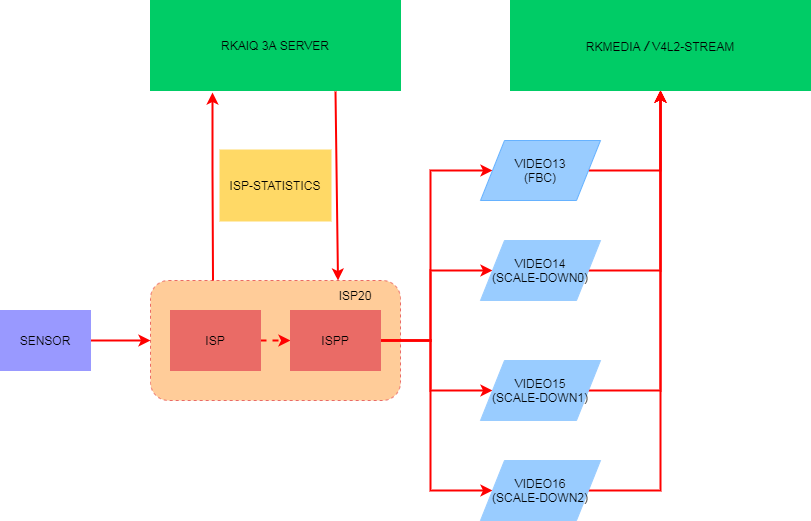
Camera data flow is shown in Figure 1. Camera data is collected by ISP20, which outputs the data after a series of image processing algorithms. RkAiq continuously obtains statistical data from ISP20, and generates new parameter feedback to ISP20 through 3A and other algorithms.
About the implementation of RkAiq, please refer to the document: "Rockchip_Development_Guide_ISP2x_CN_v1.2.0.pdf" in the docs/RV1126_RV1109/Camera directory.
And this document mainly focuses on how the applications obtain the data stream processed by ISP20.
Data flow Introduction
| Entity Name | Video ID | Max. width | support output fmt |
|---|---|---|---|
| rkispp_m_bypass | /dev/video13 | Does not support resolution setting, does not support scaling | NV12/NV16/YUYV/FBC0/FBC2/ |
| rkispp_scale0 | /dev/video14 | max width: 3264, support up to 8 times zoom | NV12/NV16/YUYV |
| rkispp_scale1 | /dev/video15 | max width: 1280, support up to 8 times zoom | NV12/NV16/YUYV |
| rkispp_scale2 | /dev/video16 | max width: 1280, support up to 8 times zoom | NV12/NV16/YUYV |
ISP20 can output four data streams, as shown in Table 1, the entity name and the corresponding device node ID can be checked by the command: media-ctl -p -d /dev/media1 (if there are multiple media devices, also try /dev /media2), to view the topology of the media device, and show part of the output as follows:
# media-ctl -p -d /dev/media1
...
- entity 5: rkispp_m_bypass (1 pad, 1 link) //means entity is bypass
            type Node subtype V4L flags 0
            device node name /dev/video13   //The corresponding device node id is/dev/video13
        pad0: Sink
                <- "rkispp-subdev":2 [ENABLED]

- entity 9: rkispp_scale0 (1 pad, 1 link)  //means entity is scale0
            type Node subtype V4L flags 0
            device node name /dev/video14  //The corresponding device node id /dev/video14
        pad0: Sink
                <- "rkispp-subdev":2 [ENABLED]

- entity 13: rkispp_scale1 (1 pad, 1 link) //means entity is scale1
             type Node subtype V4L flags 0
             device node name /dev/video15 //The corresponding device node id /dev/video15
        pad0: Sink
                <- "rkispp-subdev":2 [ENABLED]

- entity 17: rkispp_scale2 (1 pad, 1 link) //Means entity is scale2
             type Node subtype V4L flags 0
             device node name /dev/video16 //The corresponding device node id /dev/video16
        pad0: Sink
                <- "rkispp-subdev":2 [ENABLED]
...
In a few cases, if there is no media-ctl command, you can search through /sys/ node, such as:
# grep '' /sys/class/video4linux/video*/name
/sys/class/video4linux/video0/name:rkisp_mainpath
/sys/class/video4linux/video1/name:rkisp_selfpath
/sys/class/video4linux/video10/name:rkisp-input-params
/sys/class/video4linux/video11/name:rkisp-mipi-luma
/sys/class/video4linux/video12/name:rkispp_input_image
/sys/class/video4linux/video13/name:rkispp_m_bypass //bypass node/dev/video13
/sys/class/video4linux/video14/name:rkispp_scale0   //scale0 node/dev/video14
/sys/class/video4linux/video15/name:rkispp_scale1   //scale1 node/dev/video15
/sys/class/video4linux/video16/name:rkispp_scale2   //scale2 node/dev/video16
/sys/class/video4linux/video17/name:rkispp_input_params
/sys/class/video4linux/video18/name:rkispp-stats
/sys/class/video4linux/video2/name:rkisp_rawwr0
/sys/class/video4linux/video3/name:rkisp_rawwr1
/sys/class/video4linux/video4/name:rkisp_rawwr2
/sys/class/video4linux/video5/name:rkisp_rawwr3
/sys/class/video4linux/video6/name:rkisp_rawrd0_m
/sys/class/video4linux/video7/name:rkisp_rawrd1_l
/sys/class/video4linux/video8/name:rkisp_rawrd2_s
/sys/class/video4linux/video9/name:rkisp-statistics
Data Stream Obtain
Get Data Stream Based on RKMEDIA
RKMEDIA is a multimedia library of RockChip Linux platform. Please read the document "Rockchip_Instructions_Linux_Rkmedia_CN.pdf" in the docs/RV1126_RV1109/Multimedia directory for details,. This document focuses on the camera capture interface.
The camera capture interface only supports V4L2, the source code reference example: external/rkmedia/examples/uintTest/stream/camera_capture_test.cc (maybe there is no executable bin in the firmware generated by default, you need to manually push to the board by the path generated on the PC), use the following command to view the usage:
# ./camera_cap_test -h
Get Data Flow from the bypass Node
The bypass data stream is rather special which does not support resolution setting. Its output resolution is determined by the resolution of ISP input. You can check the topology of media-ctl to get the resolution of ISP input.
# media-ctl -p -d /dev/media1
...
- entity 29: rkispp-subdev (4 pads, 7 links)
             type V4L2 subdev subtype Unknown flags 0
             device node name /dev/v4l-subdev0
        pad0: Sink
                [fmt:YUYV8_2X8/2688x1520 field:none
                 crop.bounds:(0,0)/2688x1520
                 crop:(0,0)/2688x1520]
                <- "rkispp_input_image":0 []
        pad1: Sink
                <- "rkispp_input_params":0 [ENABLED]
        pad2: Source
                [fmt:YUYV8_2X8/2688x1520 field:none]
                -> "rkispp_m_bypass":0 [ENABLED]
                -> "rkispp_scale0":0 [ENABLED]
                -> "rkispp_scale1":0 [ENABLED]
                -> "rkispp_scale2":0 [ENABLED]
        pad3: Source
                -> "rkispp-stats":0 [ENABLED]
...
As shown above, the output resolution of bypass is 2688x1520. So you can run the following command to get the data flow of the bypass node:
camera_cap_test -i /dev/video13 -o output.yuv -w 2688 -h 1520 -f image:nv12
In addition, the video device IDs of different versions of SDK may be different, but the entity name is unique, so it is also supported to get data stream by using the entity name instead of video device id . The command is as follows
camera_cap_test -i rkispp_m_bypass -o output.yuv -w 2688 -h 1520 -f image:nv12
Get Data Flow from Three Scale Down Node
The three channels scale down node supports scaling. The maximum resolution supported by each channel is shown in Table 1 in section 1.2 [Data flow Introduction](# Data flow Introduction). It also supports entity name and /dev/videoX to get data stream. Take scale0 as an example:
camera_cap_test -i /dev/video14 -o output.yuv -w 2688 -h 1520 -f image:nv12

camera_cap_test -i rkispp_scale0 -o output.yuv -w 2688 -h 1520 -f image:nv12
It is recommended that the sum resolution of the three channels scale output does not exceed the resolution of the main stream.
Get FBC Format Data
ISP20 supports FBC format data output, only rkispp_m_bypass (/dev/video13) supports the FBC format data output. There are two types of FBC format data, FBC0 and FBC2. The difference is as follows:
Take sensor os04a10 as an example:
# v4l2-ctl -d /dev/video13  --set-fmt-video=width=2688,height=1520,pixelformat='FBC0' --verbose
Format Video Capture Multiplanar:
        Width/Height      : 2688/1520
        Pixel Format      : 'FBC0' (Rockchip yuv420sp fbc encoder)
        Field             : None
        Number of planes  : 1
        Flags             :
        Colorspace        : Default
        Transfer Function : Default
        YCbCr/HSV Encoding: Default
        Quantization      : Full Range
        Plane 0           :
           Bytes per Line : 2688
           Size Image     : 6386688
# v4l2-ctl -d /dev/video13  --set-fmt-video=width=2688,height=1520,pixelformat='FBC2' --verbose
Format Video Capture Multiplanar:
        Width/Height      : 2688/1520
        Pixel Format      : 'FBC2' (Rockchip yuv422sp fbc encoder)
        Field             : None
        Number of planes  : 1
        Flags             :
        Colorspace        : Default
        Transfer Function : Default
        YCbCr/HSV Encoding: Default
        Quantization      : Full Range
        Plane 0           :
           Bytes per Line : 2688
           Size Image     : 8429568
The way to get is similar to other formats, just change the format to FBC0/FBC2, as shown below:
camera_cap_test -i rkispp_m_bypass -o output.yuv -w 2688 -h 1520 -f image:fbc0
camera_cap_test -i rkispp_m_bypass -o output.yuv -w 2688 -h 1520 -f image:fbc2
Or
camera_cap_test -i /dev/video13 -o output.yuv -w 2688 -h 1520 -f image:fbc0
camera_cap_test -i /dev/video13 -o output.yuv -w 2688 -h 1520 -f image:fbc2
Note: The resolution also does not support setting. It is recommended that the main stream is FBC format data (which is more friendly to bandwidth).
Get Data Stream Based on v4l2-utils
ISP20 driver supports V4L2 interface, so you can use the v4l2-ctl tool in the v4l-utils package to obtain the data stream. During the debugging process, it is recommended to use this tool to check whether the image can be successfully output.
The v4l2-ctl snapshot is saved as a file, it cannot parse image and display it. If parse is required, mplayer can be used in Ubuntu/Debian environment, and 7yuv, etc. can be used in Windows.
For detailed instructions on v4l2-ctl and mplayer tools, please refer to the document "Rockchip_Developer_Guide_Linux_Camera_CN.pdf" in the docs/Linux/Multimedia/camera/ directory. v4l2-ctl also comes with detailed v4l2-ctl --help documentation.
Here is a simple snapshot command:
# find the node (e.g. /dev/v4l-subdev3) to set exposure
for i in `ls /dev/v4l-subdev*`; do v4l2-ctl -l -d $i |grep exposure && echo "Node: $i" ;done

v4l2-ctl -d /dev/v4l-subdev3 --set-ctrl="exposure=234,analogue_gain=76"

# find the video device node name (e.g. /dev/video18) to capture
for i in `ls /dev/media[0-9]`; do media-ctl -p -d $i |grep rkispp_m_bypass -A 4;done

v4l2-ctl -d /dev/video18 \
--set-fmt-video=width=2688,height=1520,pixelformat=NV12 \
--stream-mmap=4 --stream-to=/tmp/output.nv12 --stream-count=100 --stream-poll
RkAiq 3A Server Independent Process
When sensor outputs RAW BAYER RGB formats, such as RGGB, BGGR, GBRG, GRBG, etc., ISP20 is required to provide a series of image processing algorithms to optimize images effect, at this time RkAiq module is needed.
The SDK provides a 3A independent process way (ispserver) integrated with the RkAiq library librkaiq.so, aiming to get images with ISP debugging effects when getting data streams using the way in chapter 2 [Data Dtream Obtain](# Data Stream Obtain) .
For the detailed implementation of Ispserver, please refer to the document "Rockchip_RV1109_RV1126_Developer_Guide_Linux_Ispserver_CN.pdf" in the docs/RV1126_RV1109/camera directory.
Please firstly make sure whether the module is in the support list:
- For those modules already in the support list, there will be a corresponding xml file in the external/camera_engine_rkaiq/iqfiles/ directory
- Otherwise, please apply a module debugging application by business
How to Confirm the RkAiq Version
- Check from the source code
  # grep RK_AIQ_VERSION RkAiqVersion.h
  # define RK_AIQ_VERSION "v0.1.6"           # The output v0.1.6 is the version number of librkaiq.so version number
How to Confirm the ISP20 Driver Version Number Matched by RkAiq
- Check the ISP and ISPP driver version from the kernel source code
  # grep RKISP_DRIVER_VERSION drivers/media/platform/rockchip/isp/version.h
  #define RKISP_DRIVER_VERSION KERNEL_VERSION(0, 1, 0x5) # The output v0.1.5 is the version number of the rkisp driver

  # grep RKISPP_DRIVER_VERSION drivers/media/platform/rockchip/ispp/version.h
  #define RKISPP_DRIVER_VERSION KERNEL_VERSION(0, 1, 0x0) # The output v0.1.0 is the version number of the rkispp driver
- Check ISP and ISPP driver version from kernel log
  # dmesg  | grep "rkisp driver version"
  [    0.332831] rkisp ffb50000.rkisp: rkisp driver version: v00.01.05

  # dmesg  | grep "rkispp driver version"
  [    0.340370] rkispp ffb60000.rkispp: rkispp driver version: v00.01.00
How to Confirm Whether 3A is Working
If the product with a screen, you can preview it directly. If it is an IPC product, you can open the web page to preview. For a product without a screen or not an IPC product, you can get the data stream through the way in Chapter 2 [Data Dtream Obtain](# Data Stream Obtain) to make sure whether AE, AWB, etc. are normal .
At the same time, checking whether there is an ispserver process in the background, as follows:
# ps -ef | grep ispserver
  705 root      299m S    ispserver
  746 root      2408 S    grep ispserver
# pidof ispserver
705
You can see that the process number 705 is ispserver.
Did not Find the ispserver Process
- Check whether there are rkaiq related errors in /var/log/syslog. If so, check what the error is, whether the xml corresponding to the sensor module is not found or does not match.
- Execute
ispserverin one shell and snapshot from another shell. Get the error message corresponding to ispserver.
How to Make Sure the Name and Path of Sensor IQ Configuration File (xml)
The Sensor iq file consists of three parts:
- Sensor Type, such as os04a10, imx347
- Module Name, defined in dts, such as RV1126/RV1109 evb board, the name is "CMK-OT1607-FV1"
rockchip,camera-module-name = "CMK-OT1607-FV1"; - Module Lens Name, defined in dts, such as the following "M12-4IR-4MP-F16":
rockchip,camera-module-lens-name = "M12-4IR-4MP-F16";
The iq file name in the above example is: os04a10_CMK-OT1607-FV1_M12-4IR-4MP-F16.xml, if the oem partition is defined, it will be stored in the /oem/etc/iqfiles/ directory by default. If the oem partition is not defined, It is stored in /etc/iqfiles/, please pay attention to case sensitivity.
Abbreviations
| Abbreviations | Full Name |
|---|---|
| 3A | AWB, AE, AF |
| AE | Auto Exposure |
| AF | Auto Focus |
| AWB | Auto White Balance |
| FBC | Frame Buffer Compressed |
| FBC0 | Rockchip yuv420sp fbc encoder |
| FBC2 | Rockchip yuv422sp fbc encoder |
| RkAiq | Rockchip Automatical Image Quality |
| IQ | Image Quality |
| ISP | Image Signal Process |
| ISPP | Image Signal Post Process |