Linux A/B System
文件标识:RK-KF-YF-156
发布版本:V1.1.0
日期:2021-03-02
文件密级:□绝密 □秘密 □内部资料 ■公开
免责声明
本文档按“现状”提供,瑞芯微电子股份有限公司(“本公司”,下同)不对本文档的任何陈述、信息和内容的准确性、可靠性、完整性、适销性、特定目的性和非侵权性提供任何明示或暗示的声明或保证。本文档仅作为使用指导的参考。
由于产品版本升级或其他原因,本文档将可能在未经任何通知的情况下,不定期进行更新或修改。
商标声明
“Rockchip”、“瑞芯微”、“瑞芯”均为本公司的注册商标,归本公司所有。
本文档可能提及的其他所有注册商标或商标,由其各自拥有者所有。
版权所有 © 2021 瑞芯微电子股份有限公司
超越合理使用范畴,非经本公司书面许可,任何单位和个人不得擅自摘抄、复制本文档内容的部分或全部,并不得以任何形式传播。
瑞芯微电子股份有限公司
Rockchip Electronics Co., Ltd.
地址: 福建省福州市铜盘路软件园A区18号
客户服务电话: +86-4007-700-590
客户服务传真: +86-591-83951833
客户服务邮箱: fae@rock-chips.com
前言
概述
Linux A/B System 介绍。
产品版本
| 芯片名称 | U-Boot版本 |
|---|---|
| 所有芯片 | next-dev |
读者对象
本文档(本指南)主要适用于以下工程师:
技术支持工程师
软件开发工程师
修订记录
| 版本号 | 作者 | 修改日期 | 修改说明 |
|---|---|---|---|
| V1.0.0 | 朱志展 | 2019-01-25 | 初始版本 |
| V1.1.0 | 朱志展 | 2019-07-04 | 修订系统升级章节 |
| V1.1.1 | 黄莹 | 2021-03-02 | 修改格式 |
目录
[TOC]
引用参考
《Rockchip-Secure-Boot2.0.md》
《Rockchip-Secure-Boot-Application-Note.md》
《Android Verified Boot 2.0》
术语
简介
所谓的 A/B System 即把系统固件分为两份,系统可以从其中的一个 slot 上启动。当一份启动失败后可以从另一份启动,同时升级时可以直接将固件拷贝到另一个 slot 上而无需进入系统升级模式。
AB 数据格式及存储
存储位置为 misc 分区偏移 2KB 位置。
/* Magic for the A/B struct when serialized. */
#define AVB_AB_MAGIC "\0AB0"
#define AVB_AB_MAGIC_LEN 4

/* Versioning for the on-disk A/B metadata - keep in sync with avbtool. */
#define AVB_AB_MAJOR_VERSION 1
#define AVB_AB_MINOR_VERSION 0

/* Size of AvbABData struct. */
#define AVB_AB_DATA_SIZE 32

/* Maximum values for slot data */
#define AVB_AB_MAX_PRIORITY 15
#define AVB_AB_MAX_TRIES_REMAINING 7

typedef struct AvbABSlotData {
  /* Slot priority. Valid values range from 0 to AVB_AB_MAX_PRIORITY,
   * both inclusive with 1 being the lowest and AVB_AB_MAX_PRIORITY
   * being the highest. The special value 0 is used to indicate the
   * slot is unbootable.
   */
  uint8_t priority;

  /* Number of times left attempting to boot this slot ranging from 0
   * to AVB_AB_MAX_TRIES_REMAINING.
   */
  uint8_t tries_remaining;

  /* Non-zero if this slot has booted successfully, 0 otherwise. */
  uint8_t successful_boot;

  /* Reserved for future use. */
  uint8_t reserved[1];
} AVB_ATTR_PACKED AvbABSlotData;

/* Struct used for recording A/B metadata.
 *
 * When serialized, data is stored in network byte-order.
 */
typedef struct AvbABData {
  /* Magic number used for identification - see AVB_AB_MAGIC. */
  uint8_t magic[AVB_AB_MAGIC_LEN];

  /* Version of on-disk struct - see AVB_AB_{MAJOR,MINOR}_VERSION. */
  uint8_t version_major;
  uint8_t version_minor;

  /* Padding to ensure |slots| field start eight bytes in. */
  uint8_t reserved1[2];

  /* Per-slot metadata. */
  AvbABSlotData slots[2];

  /* Reserved for future use. */
  uint8_t reserved2[12];

  /* CRC32 of all 28 bytes preceding this field. */
  uint32_t crc32;
} AVB_ATTR_PACKED AvbABData;
对于小容量存储,没有 misc 分区,有 vendor 分区,可以考虑存储到 vendor。
在此基础上增加 lastboot,标记最后一个可启动固件。主要应用于低电情况或工厂生产测试时 retry 次数用完,而还没有进入系统调用 boot_ctrl 服务。
参考如下:
typedef struct AvbABData {
  /* Magic number used for identification - see AVB_AB_MAGIC. */
  uint8_t magic[AVB_AB_MAGIC_LEN];

  /* Version of on-disk struct - see AVB_AB_{MAJOR,MINOR}_VERSION. */
  uint8_t version_major;
  uint8_t version_minor;

  /* Padding to ensure |slots| field start eight bytes in. */
  uint8_t reserved1[2];

  /* Per-slot metadata. */
  AvbABSlotData slots[2];

  /* mark last boot slot */
  uint8_t last_boot;
  /* Reserved for future use. */
  uint8_t reserved2[11];

  /* CRC32 of all 28 bytes preceding this field. */
  uint32_t crc32;
} AVB_ATTR_PACKED AvbABData;
同时在 AvbABSlotData 中增加 is_update 标志位,标志系统升级的状态,更改如下:
typedef struct AvbABSlotData {
  /* Slot priority. Valid values range from 0 to AVB_AB_MAX_PRIORITY,
   * both inclusive with 1 being the lowest and AVB_AB_MAX_PRIORITY
   * being the highest. The special value 0 is used to indicate the
   * slot is unbootable.
   */
  uint8_t priority;

  /* Number of times left attempting to boot this slot ranging from 0
   * to AVB_AB_MAX_TRIES_REMAINING.
   */
  uint8_t tries_remaining;

  /* Non-zero if this slot has booted successfully, 0 otherwise. */
  uint8_t successful_boot;

  /* Mark update state, mark 1 if the slot is in update state, 0 otherwise. */
  uint8_t is_update : 1;
  /* Reserved for future use. */
  uint8_t reserved : 7;
} AVB_ATTR_PACKED AvbABSlotData;
最后表格来说明各个参数的含义:
AvbABData:
| 参数 | 含义 |
|---|---|
| priority | 标志 slot 优先级,0 为不可启动,15 为最高优先级 |
| tries_remaining | 尝试启动次数,设置为 7 次 |
| successful_boot | 系统启动成功后会配置该参数,1:该 slot 成功启动,0:该 slot 未成功启动 |
| is_update | 标记该 slot 的升级状态,1:该 slot 正在升级,0:该 slot 未升级或升级成功 |
AvbABSlotData:
| 参数 | 含义 |
|---|---|
| magic | 结构体头部信息:\0AB0 |
| version_major | 主版本信息 |
| version_minor | 次版本信息 |
| slots | slot 引导信息,参见 AvbABData |
| last_boot | 上一次成功启动的 slot,0:slot A 上次成功启动,1:slot B 上次成功启动 |
| crc32 | 数据校验 |
启用配置
pre-loader 说明
目前 pre-loader 支持 A/B slot 分区和单 slot 分区。
uboot 配置
CONFIG_AVB_LIBAVB=y
CONFIG_AVB_LIBAVB_AB=y
CONFIG_AVB_LIBAVB_ATX=y
CONFIG_AVB_LIBAVB_USER=y
CONFIG_RK_AVB_LIBAVB_USER=y
CONFIG_ANDROID_AB=y
system bootctrl 参考
目前 system bootctrl 设计两套控制逻辑,bootloader 全支持这两种逻辑启动。
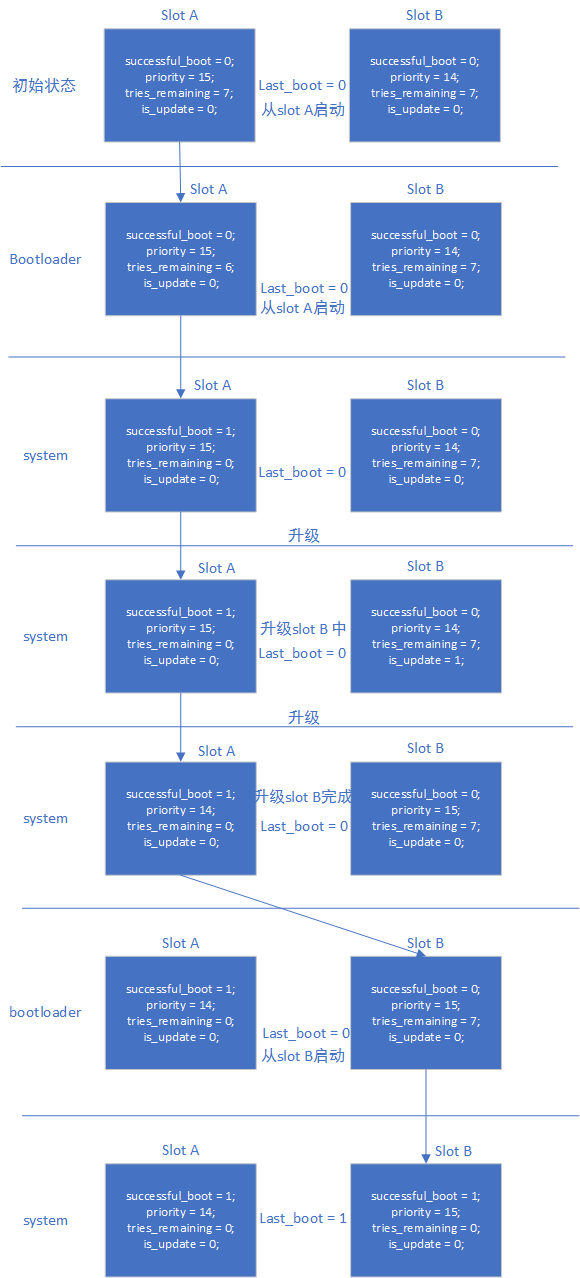
successful_boot 模式
正常进入系统后,boot_ctrl 依据 androidboot.slot_suffix,设置当前 slot 的变量:
successful_boot = 1;
priority = 15;
tries_remaining = 0;
is_update = 0;
last_boot = 0 or 1;     :refer to androidboot.slot_suffix
升级系统中,boot_ctrl 设置:
升级的slot设置:
successful_boot = 0;
priority = 14;
tries_remaining = 7;
is_update = 1;
lastboot = 0 or 1;     :refer to androidboot.slot_suffix

当前slot设置:
successful_boot = 1;
priority = 15;
tries_remaining = 0;
is_update = 0;
last_boot = 0 or 1;     :refer to androidboot.slot_suffix
升级系统完成,boot_ctrl 设置:
升级的slot设置:
successful_boot = 0;
priority = 15;
tries_remaining = 7;
is_update = 0;
lastboot = 0 or 1;     :refer to androidboot.slot_suffix

当前slot设置:
successful_boot = 1;
priority = 14;
tries_remaining = 0;
is_update = 0;
last_boot = 0 or 1;     :refer to androidboot.slot_suffix
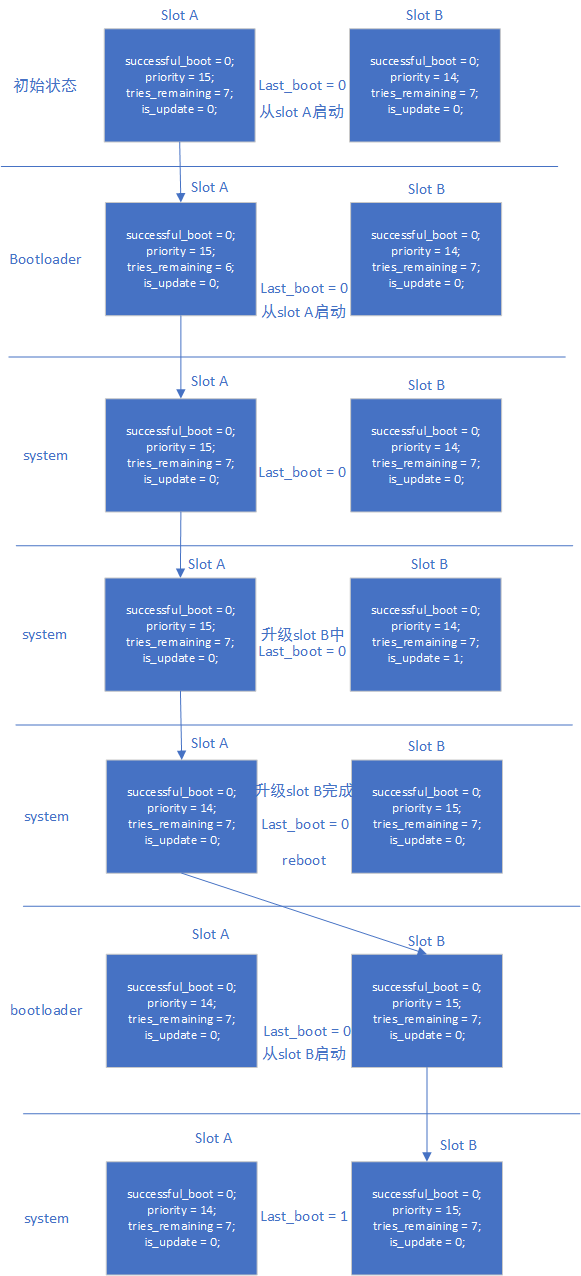
reset retry 模式
正常进入系统后,boot_ctrl 依据 androidboot.slot_suffix,设置当前 slot 的变量:
successful_boot = 0;
priority = 15;
tries_remaining = 7;
is_update = 0;
last_boot = 0 or 1;     :refer to androidboot.slot_suffix
升级系统中,boot_ctrl 设置:
升级的slot设置:
successful_boot = 0;
priority = 14;
tries_remaining = 7;
is_update = 1;
lastboot = 0 or 1;     :refer to androidboot.slot_suffix

当前slot设置:
successful_boot = 0;
priority = 15;
tries_remaining = 7;
is_update = 0;
last_boot = 0 or 1;     :refer to androidboot.slot_suffix
升级系统完成,boot_ctrl 设置:
升级的slot设置:
successful_boot = 0;
priority = 15;
tries_remaining = 7;
is_update = 0;
lastboot = 0 or 1;     :refer to androidboot.slot_suffix

当前slot设置:
successful_boot = 0;
priority = 14;
tries_remaining = 7;
is_update = 0;
last_boot = 0 or 1;     :refer to androidboot.slot_suffix
两种模式的优缺点
- successful_boot 模式
优点:只要正常启动系统,不会回退到旧版本固件,除非 system bootctrl 配置
缺点:设备长时间工作后,如果存储某些颗粒异常,会导致系统一直重启
- reset retry 模式
优点:始终保持 retry 机制,可以应对存储异常问题
缺点:会回退到旧版本固件
流程
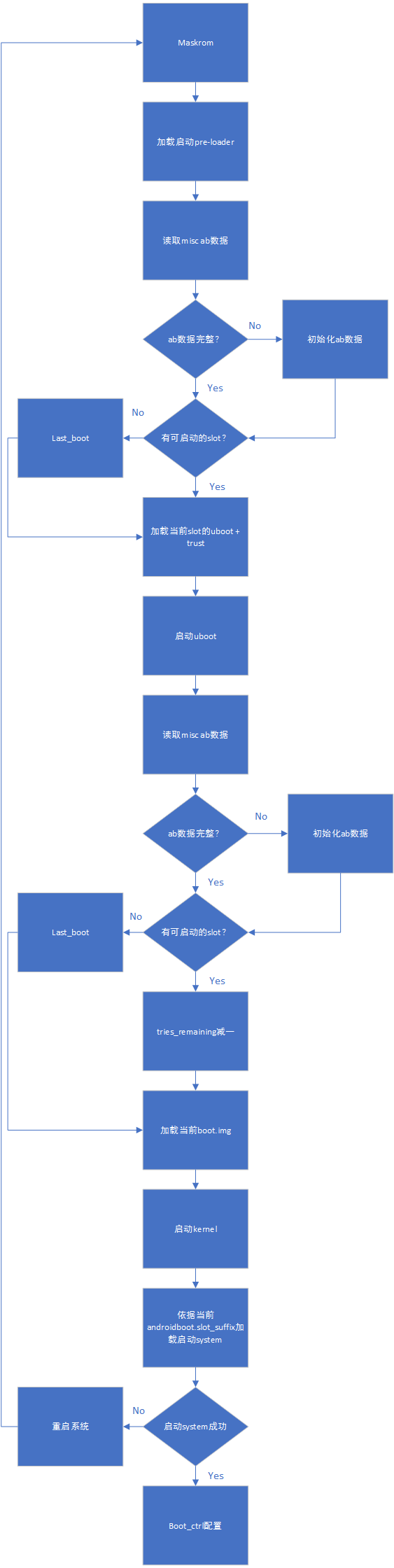
启动流程:
AB successful_boot 模式数据流程:
AB reset retry 模式数据流程:
升级及升级异常处理参考
从系统升级
参考《Rockchip Linux 升级方案开发指南》。
从 recovery 升级
AB system 不考虑支持 recovery 升级。
分区参考
FIRMWARE_VER:8.1
MACHINE_MODEL:RK3326
MACHINE_ID:007
MANUFACTURER: RK3326
MAGIC: 0x5041524B
ATAG: 0x00200800
MACHINE: 3326
CHECK_MASK: 0x80
PWR_HLD: 0,0,A,0,1
TYPE: GPT
CMDLINE: mtdparts=rk29xxnand:0x00002000@0x00004000(uboot_a),0x00002000@0x00006000(uboot_b),0x00002000@0x00008000(trust_a),0x00002000@0x0000a000(trust_b),0x00001000@0x0000c000(misc),0x00001000@0x0000d000(vbmeta_a),0x00001000@0x0000e000(vbmeta_b),0x00020000@0x0000e000(boot_a),0x00020000@0x0002e000(boot_b),0x00100000@0x0004e000(system_a),0x00300000@0x0032e000(system_b),0x00100000@0x0062e000(vendor_a),0x00100000@0x0072e000(vendor_b),0x00002000@0x0082e000(oem_a),0x00002000@0x00830000(oem_b),0x0010000@0x00832000(factory),0x00008000@0x842000(factory_bootloader),0x00080000@0x008ca000(oem),-@0x0094a000(userdata)
测试
准备一套可测试 AB 的固件。
测试successful_boot 模式
- 只烧写 slot A,系统从 slot A 启动。设置从 slot B 启动,系统从 slot A 启动。测试完成,清空 misc 分区
- 烧写 slot A 与 slot B,启动系统,当前系统为 slot A。设置系统从 slot B 启动,reboot 系统,当前系统为 slot B。测试完成,清空 misc 分区
- 烧写 slot A 与 slot B,迅速 reset 系统 14 次后,retry counter 用完,还能从 last_boot 指定的系统启动,即能正常从 slot A 启动。测试完成,清空 misc 分区
- 烧写 slot A 与 slot B,启动系统,当前系统为 slot A。设置系统从 slot B 启动,reboot 系统,当前系统为 slot B。设置系统从 slot A 启动,reboot 系统,当前系统为 slot A。测试完成,清空 misc 分区
测试reset retry 模式
- 只烧写 slot A,系统从 slot A 启动。设置从 slot B 启动,系统从 slot A 启动。测试完成,清空 misc 分区
- 烧写 slot A 与 slot B,启动系统,当前系统为 slot A。设置系统从 slot B 启动,reboot 系统,当前系统为 slot B。测试完成,清空 misc 分区
- 烧写 slot A 与 slot B,迅速 reset 系统 14 次后,retry counter 用完,还能从 last_boot 指定的系统启动,即能正常从 slot A 启动。测试完成,清空 misc 分区
- 烧写 slot A 与 slot B,其中 slot B 的 boot.img 损坏,启动系统,当前系统为 slot A。设置系统从 slot B 启动,reboot 系统,系统会重启 7 次后,从 slot A 正常启动系统。测试完成,清空 misc 分区
- 烧写 slot A 与 slot B,启动系统,当前系统为 slot A。设置系统从 slot B 启动,reboot 系统,当前系统为 slot B。设置系统从 slot A 启动,reboot 系统,当前系统为 slot A。测试完成,清空 misc 分区