[TOC]
Advanced Principles
kernel-DTB
Design Background
The native architecture of U-Boot requires that one board must correspond to one U-Boot dts, and the dtb generated from the U-Boot dts is packaged into U-Boot's own image. This results in N boards requiring N U-Boot images on each SoC platform.
It is not difficult to see that the main differences between different boards on the same SoC platform are peripherals, while the SoC core part is identical. To achieve the goal that one SoC platform requires only one U-Boot image, the RK platform added the kernel DTB mechanism. The essence is to switch to the kernel DTB at an early stage and use its configuration information to initialize peripherals.
Therefore, by supporting kernel DTB, the RK platform can achieve compatibility with board differences, such as: display, pmic/regulator, pinctrl, clk, etc.
Enabling kernel DTB depends on OF_LIVE (live device tree, referred to as: live-dt).
config USING_KERNEL_DTB
        bool "Using dtb from Kernel/resource for U-Boot"
        depends on RKIMG_BOOTLOADER && OF_LIVE
        default y
        help
          This enable support to read dtb from resource and use it for U-Boot,
          the uart and emmc will still using U-Boot dtb, but other devices like
          regulator/pmic, display, usb will use dts node from kernel.
Live device tree
Background and Principle:
After introducing kernel DTB, there are two DTBs in the U-Boot phase. Modules such as storage, serial port, and Crypto are related to the U-Boot DTB, while other modules are related to the kernel DTB. In the U-Boot phase, these two types of modules may need to be accessed crosswise at different times, and the modules themselves may need to access their own DTB node information.
These two types of modules belong to different DTBs, but gd->fdt_blob can only point to one of them and is not convenient to switch arbitrarily. How to solve this? Because the kernel dts will eventually be passed to the kernel for use, we cannot simply overlay certain nodes from the U-Boot dts onto the kernel dts to merge them into one.
Live dt can solve this problem. The principle of live dt is: during the initialization phase, U-Boot directly scans the entire DTB, converts all DTB nodes into a struct device_node linked list, and binds them to specific device-drivers. Thereafter, when a device-driver needs to access a DTB node, it directly accesses its own device_node without needing to access the original DTB.
Therefore, both the U-Boot and kernel DTBs are bound to their respective device-driver groups, and no longer need to directly access DTB files.
This solves the conflict caused by accessing two DTBs.
More references:
./doc/driver-model/livetree.txt
fdt and live dt conversion:
The ofnode type (include/dm/ofnode.h) is an encapsulation format that supports both types of dt. When using live dt, device_node is used to access dt nodes; when using fdt, offset is used to access dt nodes. When both types of drivers need to be supported simultaneously, use the ofnode type.
ofnode structure:
 /*
  * @np: Pointer to device node, used for live tree
  * @of_offset: Pointer into flat device tree, used for flat tree. Note that this
  *      is not a really a pointer to a node: it is an offset value. See above.
  */
 typedef union ofnode_union {
         const struct device_node *np;   /* will be used for future live tree */
         long of_offset;
 } ofnode;
- Functions starting with "dev_" and "ofnode_" support both dt access methods;
- Functions starting with "of_" are interfaces that only support live dt;
- Functions starting with "fdtdec_" and "fdt_" are interfaces that only support fdt;
Mechanism Implementation
The kernel dtb switch is implemented in init_kernel_dtb() in ./arch/arm/mach-rockchip/board.c. At this point, the U-Boot dts has already been scanned, and storage drivers such as mmc/nand/nor can work normally.
The kernel dtb is then read from the firmware, live dt table is built and all device-drivers are bound, and finally the gd->fdt_blob pointer is updated to point to the kernel dtb.
U-Boot
- After U-Boot compilation is complete, two dtbs are generated in the
./dts/directory:- dt.dtb: Compiled from the dts specified by
CONFIG_DEFAULT_DEVICE_TREEin defconfig; - dt-spl.dtb: Obtained by extracting all nodes with the
u-boot,dm-pre-relocproperty from dt.dtb, then removing the properties specified byCONFIG_OF_SPL_REMOVE_PROPSin defconfig. It generally only contains nodes that drivers such as serial port, DDR, and storage must depend on: DMC, UART, MMC, NAND, GRF, CRU, etc.
- dt.dtb: Compiled from the dts specified by
- When
CONFIG_USING_KERNEL_DTBis not enabled, the system uses dt.dtb; whenCONFIG_USING_KERNEL_DTBis enabled, the system uses dt-spl.dtb. - dt.dtb or dt-spl.dtb is renamed to u-boot.dtb after U-Boot compilation and then appended to the end of u-boot.bin. Users can check the content of u-boot.dtb using the fdtdump command.
Kernel Parameter Passing
This chapter describes how U-Boot passes parameters to the kernel.
cmdline
U-Boot reads /chosen/bootargs from the kernel DTB, modifies/appends new content, and then writes it back to the /chosen/bootargs node, thereby passing the cmdline.
Memory Size
U-Boot modifies the /memory node in the kernel DTB, filling in the available memory size information. The boot information has relevant prints:
......
# Booting Android Image at 0x0027f800 ...
Kernel load addr 0x00280000 size 23387 KiB
RAM disk load addr 0x0a200000 size 782 KiB
# Flattened Device Tree blob at 08300000
   Booting using the fdt blob at 0x8300000
   XIP Kernel Image ... OK
  'reserved-memory' ramoops@110000: addr=110000 size=f0000
   Using Device Tree in place at 0000000008300000, end 0000000008314648

// Kernel-available memory space
Adding bank: 0x00200000 - 0x08400000 (size: 0x08200000)
Adding bank: 0x0a200000 - 0x80000000 (size: 0x75e00000)
Total: 473.217 ms

Starting kernel ...
Other Methods
Other parameter passing methods essentially also modify the kernel DTB. As follows:
| Node/Property | Operation | Description |
|---|---|---|
| /serial-number | Create | Serial number |
| /memory | Modify | Kernel-visible memory |
| /display-subsystem/route/route-edp/ | Append | Display related params (edp as example) |
| /chosen/linux,initrd-start | Create | Ramdisk start address |
| /chosen/linux,initrd-end | Create | Ramdisk end address |
| /bootargs | Modify | Kernel-visible cmdline |
| mac-address or local-mac-address in GMAC node | Modify | MAC address |
| arch/arm/mach-rockchip/board.c: board_fdt_fixup() | Modify | Board-level fdt fixup |
AB System
AB Data Format
The A/B data structure is located at offset 2KB in the misc partition.
/* Magic for the A/B struct when serialized. */
#define AVB_AB_MAGIC "\0AB0"
#define AVB_AB_MAGIC_LEN 4

/* Versioning for the on-disk A/B metadata - keep in sync with avbtool. */
#define AVB_AB_MAJOR_VERSION 1
#define AVB_AB_MINOR_VERSION 0

/* Size of AvbABData struct. */
#define AVB_AB_DATA_SIZE 32

/* Maximum values for slot data */
#define AVB_AB_MAX_PRIORITY 15
#define AVB_AB_MAX_TRIES_REMAINING 7

typedef struct AvbABSlotData {
  /* Slot priority. Valid values range from 0 to AVB_AB_MAX_PRIORITY,
   * both inclusive with 1 being the lowest and AVB_AB_MAX_PRIORITY
   * being the highest. The special value 0 is used to indicate the
   * slot is unbootable.
   */
  uint8_t priority;

  /* Number of times left attempting to boot this slot ranging from 0
   * to AVB_AB_MAX_TRIES_REMAINING.
   */
  uint8_t tries_remaining;

  /* Non-zero if this slot has booted successfully, 0 otherwise. */
  uint8_t successful_boot;

  /* Reserved for future use. */
  uint8_t reserved[1];
} AVB_ATTR_PACKED AvbABSlotData;

/* Struct used for recording A/B metadata.
 *
 * When serialized, data is stored in network byte-order.
 */
typedef struct AvbABData {
  /* Magic number used for identification - see AVB_AB_MAGIC. */
  uint8_t magic[AVB_AB_MAGIC_LEN];

  /* Version of on-disk struct - see AVB_AB_{MAJOR,MINOR}_VERSION. */
  uint8_t version_major;
  uint8_t version_minor;

  /* Padding to ensure |slots| field start eight bytes in. */
  uint8_t reserved1[2];

  /* Per-slot metadata. */
  AvbABSlotData slots[2];

  /* Reserved for future use. */
  uint8_t reserved2[12];

  /* CRC32 of all 28 bytes preceding this field. */
  uint32_t crc32;
} AVB_ATTR_PACKED AvbABData;
For small-capacity storage with no misc partition but a vendor partition, it can be stored in vendor.
On this basis, lastboot is added to mark the last bootable firmware. It is mainly used in low battery situations or during factory production testing when the retry count is exhausted before the system calls the boot_ctrl service. Reference as follows:
typedef struct AvbABData {
  /* Magic number used for identification - see AVB_AB_MAGIC. */
  uint8_t magic[AVB_AB_MAGIC_LEN];

  /* Version of on-disk struct - see AVB_AB_{MAJOR,MINOR}_VERSION. */
  uint8_t version_major;
  uint8_t version_minor;

  /* Padding to ensure |slots| field start eight bytes in. */
  uint8_t reserved1[2];

  /* Per-slot metadata. */
  AvbABSlotData slots[2];

  /* mark last boot slot */
  uint8_t last_boot;
  /* Reserved for future use. */
  uint8_t reserved2[11];

  /* CRC32 of all 28 bytes preceding this field. */
  uint32_t crc32;
} AVB_ATTR_PACKED AvbABData;
At the same time, the is_update flag is added to AvbABSlotData to indicate the update status of the system. The changes are as follows:
typedef struct AvbABSlotData {
  /* Slot priority. Valid values range from 0 to AVB_AB_MAX_PRIORITY,
   * both inclusive with 1 being the lowest and AVB_AB_MAX_PRIORITY
   * being the highest. The special value 0 is used to indicate the
   * slot is unbootable.
   */
  uint8_t priority;

  /* Number of times left attempting to boot this slot ranging from 0
   * to AVB_AB_MAX_TRIES_REMAINING.
   */
  uint8_t tries_remaining;

  /* Non-zero if this slot has booted successfully, 0 otherwise. */
  uint8_t successful_boot;

  /* Mark update state, mark 1 if the slot is in update state, 0 otherwise. */
  uint8_t is_update : 1;
  /* Reserved for future use. */
  uint8_t reserved : 7;
} AVB_ATTR_PACKED AvbABSlotData;
Finally, a table explains the meaning of each parameter:
AvbABData:
| Parameter | Description |
|---|---|
| priority | Slot priority, 0 means unbootable, 15 is the highest priority |
| tries_remaining | Number of boot attempts, set to 7 |
| successful_boot | Configured after successful system boot, 1: slot booted successfully, 0: slot did not boot successfully |
| is_update | Marks the update status of the slot, 1: slot is being updated, 0: slot is not updated or update was successful |
AvbABSlotData:
| Parameter | Description |
|---|---|
| magic | Structure header information: \0AB0 |
| version_major | Major version information |
| version_minor | Minor version information |
| slots | Slot boot information, see AvbABData |
| last_boot | The slot that booted successfully last time, 0: slot A booted successfully last time, 1: slot B booted successfully last time |
| crc32 | Data checksum |
AB Boot Modes
Currently, the system bootctrl designs two control modes, and bootloader supports booting from both modes.
successful-boot
After normal system entry, boot_ctrl sets the current slot variables based on androidboot.slot_suffix:
successful_boot = 1;
priority = 15;
tries_remaining = 0;
is_update = 0;
last_boot = 0 or 1;     :refer to androidboot.slot_suffix
During system upgrade, boot_ctrl sets:
Upgrading slot settings:
successful_boot = 0;
priority = 14;
tries_remaining = 7;
is_update = 1;
lastboot = 0 or 1;     :refer to androidboot.slot_suffix

Current slot settings:
successful_boot = 1;
priority = 15;
tries_remaining = 0;
is_update = 0;
last_boot = 0 or 1;     :refer to androidboot.slot_suffix
After system upgrade is complete, boot_ctrl sets:
Upgraded slot settings:
successful_boot = 0;
priority = 15;
tries_remaining = 7;
is_update = 0;
lastboot = 0 or 1;     :refer to androidboot.slot_suffix

Current slot settings:
successful_boot = 1;
priority = 14;
tries_remaining = 0;
is_update = 0;
last_boot = 0 or 1;     :refer to androidboot.slot_suffix
reset-retry
After normal system entry, boot_ctrl sets the current slot variables based on androidboot.slot_suffix:
successful_boot = 0;
priority = 15;
tries_remaining = 7;
is_update = 0;
last_boot = 0 or 1;     :refer to androidboot.slot_suffix
During system upgrade, boot_ctrl sets:
Upgrading slot settings:
successful_boot = 0;
priority = 14;
tries_remaining = 7;
is_update = 1;
lastboot = 0 or 1;     :refer to androidboot.slot_suffix

Current slot settings:
successful_boot = 0;
priority = 15;
tries_remaining = 7;
is_update = 0;
last_boot = 0 or 1;     :refer to androidboot.slot_suffix
After system upgrade is complete, boot_ctrl sets:
Upgraded slot settings:
successful_boot = 0;
priority = 15;
tries_remaining = 7;
is_update = 0;
lastboot = 0 or 1;     :refer to androidboot.slot_suffix

Current slot settings:
successful_boot = 0;
priority = 14;
tries_remaining = 7;
is_update = 0;
last_boot = 0 or 1;     :refer to androidboot.slot_suffix
Mode Comparison
- successful_boot mode
- Advantage: As long as the system boots normally, it will not roll back to the old firmware version, unless configured by system bootctrl
- Disadvantage: After long-term operation, if some storage particles become abnormal, the system may keep rebooting
- reset retry mode
- Advantage: Always maintains the retry mechanism, can handle storage exception issues
- Disadvantage: May roll back to the old firmware version
Boot Flow
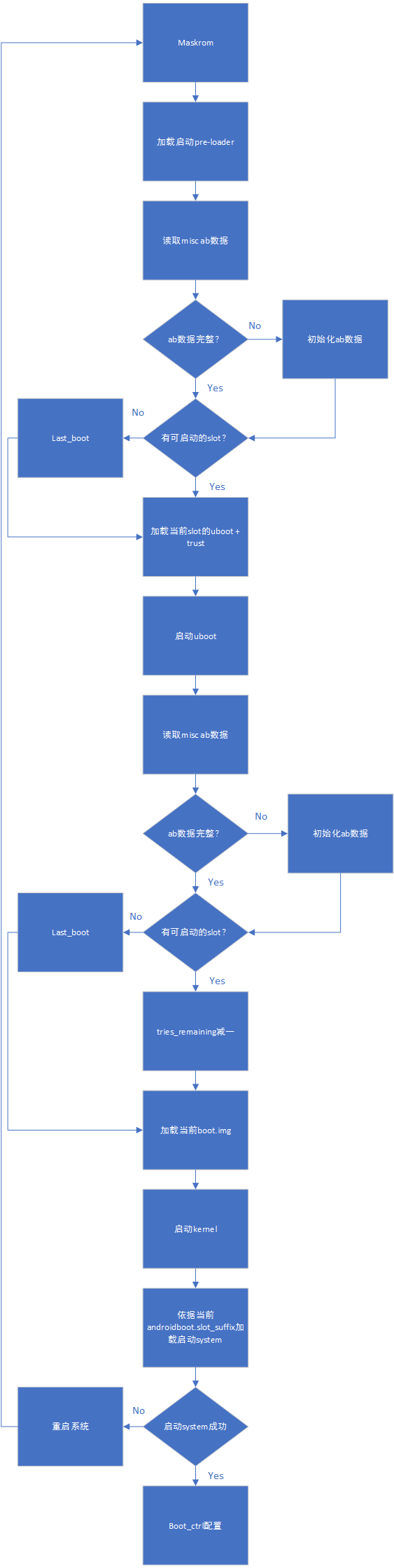
AB successful_boot mode data flow:
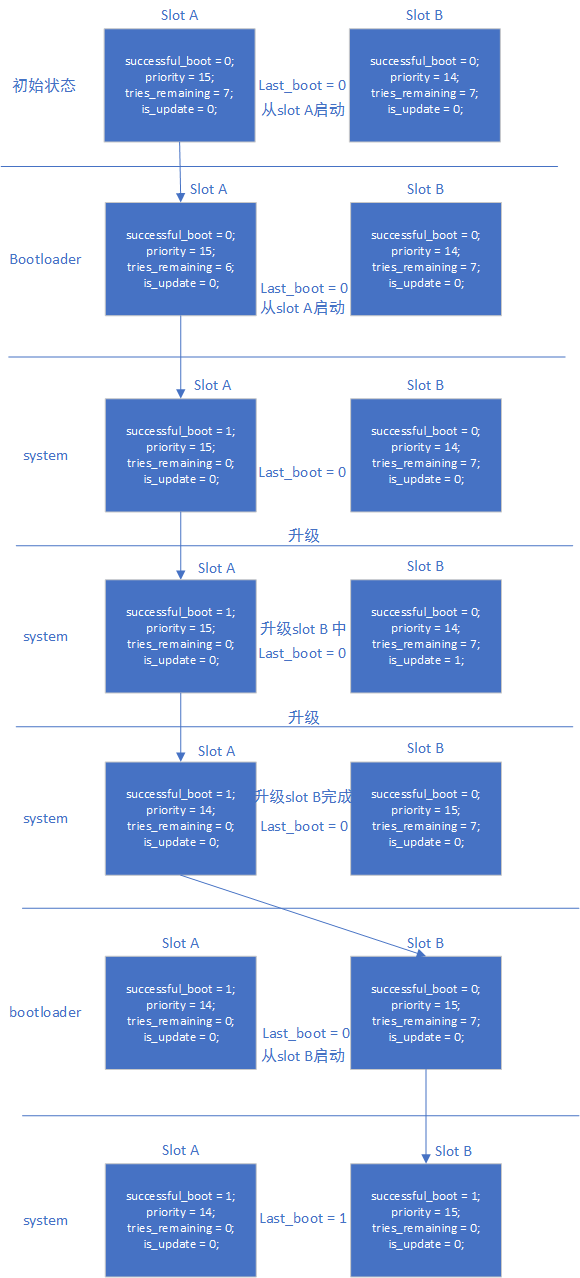
AB reset retry mode data flow:
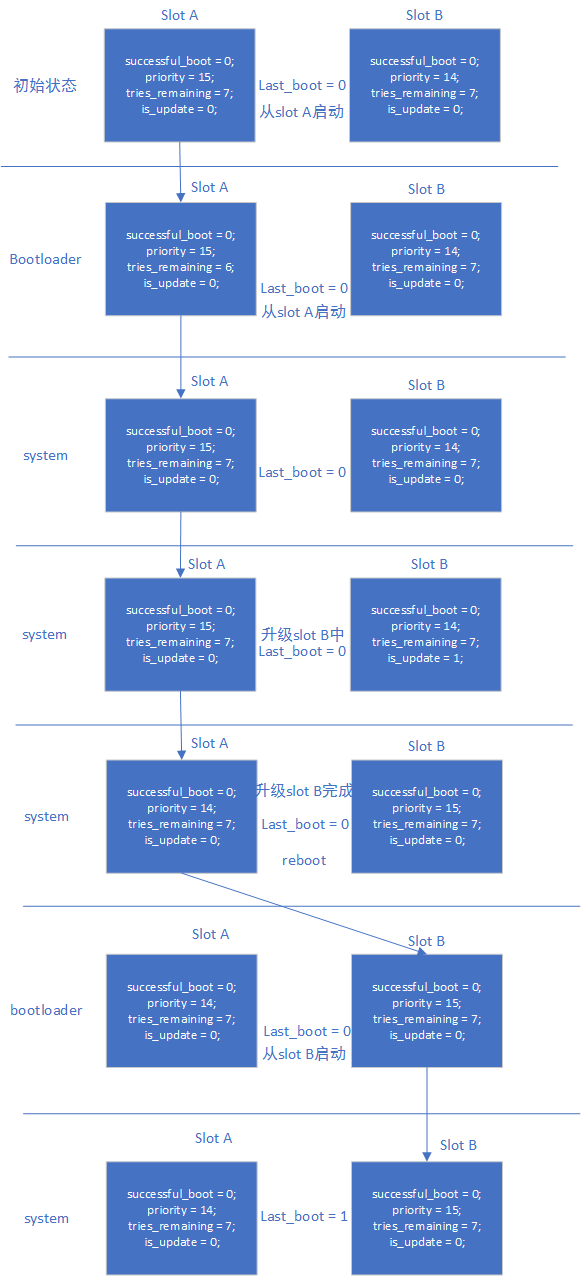
Upgrade and Exceptions
- System upgrade: Refer to "Rockchip Linux Upgrade Solution Development Guide"
- recovery upgrade: AB system does not support recovery upgrade
Verification Methods
successful-boot
- Burn only slot A, the system boots from slot A. Set boot from slot B, the system boots from slot A. Test completed, clear misc partition
- Burn slot A and slot B, boot the system, current system is slot A. Set system to boot from slot B, reboot the system, current system is slot B. Test completed, clear misc partition
- Burn slot A and slot B, quickly reset the system 14 times, after the retry counter is exhausted, it can still boot from the system specified by last_boot, i.e., it can boot normally from slot A. Test completed, clear misc partition
- Burn slot A and slot B, boot the system, current system is slot A. Set system to boot from slot B, reboot the system, current system is slot B. Set system to boot from slot A, reboot the system, current system is slot A. Test completed, clear misc partition
reset-retry
- Burn only slot A, the system boots from slot A. Set boot from slot B, the system boots from slot A. Test completed, clear misc partition
- Burn slot A and slot B, boot the system, current system is slot A. Set system to boot from slot B, reboot the system, current system is slot B. Test completed, clear misc partition
- Burn slot A and slot B, quickly reset the system 14 times, after the retry counter is exhausted, it can still boot from the system specified by last_boot, i.e., it can boot normally from slot A. Test completed, clear misc partition
- Burn slot A and slot B, where slot B's boot.img is corrupted, boot the system, current system is slot A. Set system to boot from slot B, reboot the system, the system will restart 7 times and then boot normally from slot A. Test completed, clear misc partition
- Burn slot A and slot B, boot the system, current system is slot A. Set system to boot from slot B, reboot the system, current system is slot B. Set system to boot from slot A, reboot the system, current system is slot A. Test completed, clear misc partition
References
"Rockchip-Secure-Boot2.0.md"
"Rockchip-Secure-Boot-Application-Note.md"
"Android Verified Boot 2.0"
AVB Secure Boot
References
"Rockchip-Secure-Boot-Application-Note.md"
"Android Verified Boot 2.0"
"Rockchip_Developer_Guide_Linux4.4_SecureBoot_CN.pdf"
Terminology
AVB : Android Verified Boot
OTP & efuse : One Time Programmable
Product RootKey (PRK): The root key of AVB, verified by the root key that signs loader, uboot & trust
ProductIntermediate Key (PIK): Intermediate key, serves as an intermediary
ProductSigning Key (PSK): Key used for signing firmware
ProductUnlock Key (PUK): Key used for unlocking the device
Keys are separated with clear responsibilities, which can reduce the risk of key leakage.
Introduction
This document introduces the Rockchip secure verified boot process. The so-called secure verified boot process is divided into security verification and integrity verification. Security verification is the verification of the public key. The process is: read the public key hash from secure storage (OTP & efuse), compare it with the calculated public key hash to check consistency, then use the public key to decrypt the firmware hash. Integrity verification is the verification of firmware integrity. The process is: load the firmware from storage, calculate the firmware hash and compare it with the decrypted hash for consistency.
Encryption Example
The device's secure verified boot process is similar to the data encryption verification process in communication. This example can help accelerate understanding of the avb verification process. Suppose Alice wants to send digital information to Bob. To ensure the confidentiality, authenticity, integrity, and non-repudiation of the information transmission, the information needs to be digitally encrypted and signed. The transmission process is:
-
Alice prepares the digital information (plaintext) to be transmitted;
-
Alice performs a hash operation on the digital information to obtain a message digest;
-
Alice encrypts the message digest with her own private key to obtain Alice's digital signature, and appends it to the digital information;
-
Alice randomly generates an encryption key and uses this key to encrypt the information to be sent, forming ciphertext;
-
Alice encrypts the randomly generated encryption key with Bob's public key, and sends the encrypted DES key together with the ciphertext to Bob;
-
Bob receives the ciphertext and the encrypted DES key from Alice, first decrypts the encrypted DES key with his own private key, obtaining the encryption key randomly generated by Alice;
-
Bob then uses the random key to decrypt the received ciphertext, obtaining the plaintext digital information, and then discards the random key;
-
Bob decrypts Alice's digital signature with Alice's public key, obtaining the message digest;
-
Bob performs another hash operation on the received plaintext using the same hash algorithm, obtaining a new message digest;
-
Bob compares the received message digest with the newly generated message digest. If they match, it indicates that the received information has not been modified.
The DES algorithm mentioned above can be replaced with other algorithms, such as the AES encryption algorithm, and the public-private key algorithm can use the RSA algorithm. The flow is as follows:

AVB
AVB stands for Android Verified Boot, a firmware verification process designed by Google, mainly used for verifying firmware such as boot and system. Rockchip Secure Boot references the verification methods in communication and AVB to implement a complete Secure Boot verification scheme.
AVB Features
- Security verification
- Integrity verification
- Anti-rollback protection
- persistent partition support
- chained partitions support, can use the same private key as boot and system, or the oem can keep the private key themselves, but must be signed by PRK
Key + Signature + Certificate
#!/bin/sh
touch temp.bin
openssl genpkey -algorithm RSA -pkeyopt rsa_keygen_bits:4096 -outform PEM -out testkey_prk.pem
openssl genpkey -algorithm RSA -pkeyopt rsa_keygen_bits:4096 -outform PEM -out testkey_psk.pem
openssl genpkey -algorithm RSA -pkeyopt rsa_keygen_bits:4096 -outform PEM -out testkey_pik.pem
python avbtool make_atx_certificate --output=pik_certificate.bin --subject=temp.bin --subject_key=testkey_pik.pem --subject_is_intermediate_authority --subject_key_version 42 --authority_key=testkey_prk.pem
python avbtool make_atx_certificate --output=psk_certificate.bin --subject=product_id.bin --subject_key=testkey_psk.pem --subject_key_version 42 --authority_key=testkey_pik.pem
python avbtool make_atx_metadata --output=metadata.bin --intermediate_key_certificate=pik_certificate.bin --product_key_certificate=psk_certificate.bin
permanent_attributes.bin generation:
python avbtool make_atx_permanent_attributes --output=permanent_attributes.bin --product_id=product_id.bin --root_authority_key=testkey_prk.pem
Among them, product_id.bin needs to be defined by the user, occupies 16 bytes, and can be defined as the product ID.
boot.img signing example:
avbtool add_hash_footer --image boot.img --partition_size 33554432 --partition_name boot --key testkey_psk.pem --algorithm SHA256_RSA4096
Note: partition size must be at least 64K larger than the original firmware, and also 4K aligned, and must not exceed the partition size defined in parameter.txt.
system.img signing example:
avbtool add_hashtree_footer --partition_size 536870912 --partition_name system --image system.img --algorithm SHA256_RSA4096 --key testkey_psk.pem
Generate vbmeta containing metadata.bin, example command:
python avbtool make_vbmeta_image --public_key_metadata metadata.bin --include_descriptors_from_image boot.img --include_descriptors_from_image system.img --generate_dm_verity_cmdline_from_hashtree system.img --algorithm SHA256_RSA4096 --key testkey_psk.pem --output vbmeta.img
Finally, burn the generated vbmeta.img to the corresponding partition, e.g., the vbmeta partition.
Generate PrivateKey.pem and PublicKey.pem via SecureBootTool.

Sign permanent_attributes.bin:
openssl dgst -sha256 -out permanent_attributes_cer.bin -sign PrivateKey.pem permanent_attributes.bin
permanent_attributes.bin is the security authentication data of the entire system. Its hash needs to be burned into efuse or OTP, or its data can be authenticated by the previous level (pre-load). Due to insufficient efuse space planned on rockchip platforms, the verification of permanent_attributes.bin is performed through the public key of the previous level and the certificate of permanent_attributes.bin. For platforms with OTP, where secure data space is sufficient, the hash of permanent_attributes.bin is directly burned into OTP.
efuse and OTP support by platform:
| Platform | efuse | OTP |
|---|---|---|
| rk3399 | ✔ | |
| rk3368 | ✔ | |
| rk3328 | ✔ | |
| rk3326 | ✔ | |
| rk3308 | ✔ | |
| rk3288 | ✔ | |
| rk3229 | ✔ | |
| rk3126 | ✔ | |
| rk3128 | ✔ |
efuse platform pub_key burning:
fastboot stage permanent_attributes.bin
fastboot oem fuse at-perm-attr
fastboot stage permanent_attributes_cer.bin
fastboot oem fuse at-rsa-perm-attr
OTP platform pub_key burning:
fastboot stage permanent_attributes.bin
fastboot oem fuse at-perm-attr
Complete signing flow:

AVB lock
fastboot oem at-lock-vboot
For how to enter fastboot, see the fastboot command support chapter.
AVB unlock
Currently, Rockchip uses strict security verification. The following needs to be added in the corresponding defconfig:
CONFIG_RK_AVB_LIBAVB_ENABLE_ATH_UNLOCK=y
Otherwise, entering fastboot oem at-unlock-vboot will unlock the device, and the device will boot successfully even if verification of vbmeta.img or boot.img fails.
First, generate PUK:
openssl genpkey -algorithm RSA -pkeyopt rsa_keygen_bits:4096 -outform PEM -out testkey_puk.pem
unlock_credential.bin is the certificate that needs to be downloaded to the device for unlocking. The generation process is as follows:
python avbtool make_atx_certificate --output=puk_certificate.bin --subject=product_id.bin --subject_key=testkey_puk.pem --usage=com.google.android.things.vboot.unlock --subject_key_version 42 --authority_key=testkey_pik.pem
To obtain unlock_credential.bin from the device, use the avb-challenge-verify.py script. Execute the following command to obtain unlock_credential.bin:
python avbtool make_atx_unlock_credential --output=unlock_credential.bin --intermediate_key_certificate=pik_certificate.bin --unlock_key_certificate=puk_certificate.bin --challenge=unlock_challenge.bin --unlock_key=testkey_puk.pem
Finally, the certificate can be downloaded to the device via fastboot command and unlock the device. The fastboot command is as follows:
fastboot stage unlock_credential.bin
fastboot oem at-unlock-vboot
Finally, the OTP device unlock flow:

Finally, the efuse device unlock flow:

The final operation flow is as follows:
- The device enters fastboot mode. On the PC side, enter
fastboot oem at-get-vboot-unlock-challenge
fastboot get_staged raw_unlock_challenge.bin
Obtain data containing the version, Product Id, and a 16-byte random number. Extract the random number as unlock_challenge.bin.
- Use avbtool to generate unlock_credential.bin, refer to make_unlock.sh.
- On the PC side, enter
fastboot stage unlock_credential.bin
fastboot oem at-unlock-vboot
Note: At this point, the device must remain in the first fastboot mode state. During this time, it must not be powered off, shut down, or restarted. Because after step 1 is completed, the device stores the generated random number. If power is lost, the device is shut down, or restarted, the random number will be lost, and subsequent challenge signature verification will fail due to the random number mismatch.
If enabled:
CONFIG_MISC=y
CONFIG_ROCKCHIP_EFUSE=y
CONFIG_ROCKCHIP_OTP=y
Then CPUID will be used as the challenge number. Since CPUID is matched to the machine and data will not be lost due to shutdown, the generated unlock_credential.bin can be reused. This eliminates the need to repeatedly generate unlock_challenge.bin and create unlock_credential.bin. The unlock steps become:
fastboot oem at-get-vboot-unlock-challenge
fastboot stage unlock_credential.bin
fastboot oem at-unlock-vboot
- The device enters the unlocked state and begins unlocking.
make_unlock.sh reference
#!/bin/sh
python avb-challenge-verify.py raw_unlock_challenge.bin product_id.bin
python avbtool make_unlock_credential --output=unlock_credential.bin --intermediate_key_certificate=pik_certificate.bin --unlock_key_certificate=puk_certificate.bin --challenge=unlock_challenge.bin --unlock_key=testkey_puk.pem
avb-challenge-verify.py source code
#/user/bin/env python
"This is a test module for getting unlock_challenge.bin"
import sys
import  os
from hashlib import sha256

def challenge_verify():
	if (len(sys.argv) != 3) :
		print "Usage: rkpublickey.py [challenge_file] [product_id_file]"
		return
	if ((sys.argv[1] == "-h") or (sys.argv[1] == "--h")):
		print "Usage: rkpublickey.py [challenge_file] [product_id_file]"
		return
	try:
		challenge_file = open(sys.argv[1], 'rb')
		product_id_file = open(sys.argv[2], 'rb')
		challenge_random_file = open('unlock_challenge.bin', 'wb')
		challenge_data = challenge_file.read(52)
		product_id_data = product_id_file.read(16)
		product_id_hash = sha256(product_id_data).digest()
		print("The challege version is %d" %ord(challenge_data[0]))
		if (product_id_hash != challenge_data[4:36]) :
			print("Product id verify error!")
			return
		challenge_random_file.write(challenge_data[36:52])
		print("Success!")

	finally:
		if challenge_file:
			challenge_file.close()
		if product_id_file:
			product_id_file.close()
		if challenge_random_file:
			challenge_random_file.close()

if __name__ == '__main__':
	challenge_verify()
U-Boot Enablement
Enabling avb requires trust support. U-Boot needs to be configured in the defconfig file:
CONFIG_OPTEE_CLIENT=y
CONFIG_OPTEE_V1=y
CONFIG_OPTEE_ALWAYS_USE_SECURITY_PARTITION=y  // Store security data in security partition
CONFIG_OPTEE_V1: Applicable platforms: 312x, 322x, 3288, 3228H, 3368, 3399. CONFIG_OPTEE_V2: Applicable platforms: 3326, 3308. CONFIG_OPTEE_ALWAYS_USE_SECURITY_PARTITION: Only enable this macro when emmc's rpmb is unavailable. Disabled by default.
Enabling avb requires configuration in the defconfig file:
CONFIG_AVB_LIBAVB=y
CONFIG_AVB_LIBAVB_AB=y
CONFIG_AVB_LIBAVB_ATX=y
CONFIG_AVB_LIBAVB_USER=y
CONFIG_RK_AVB_LIBAVB_USER=y
// The above are mandatory, the following options support AVB and A/B features, the two features can be used separately
CONFIG_ANDROID_AB=y // This supports A/B
CONFIG_ANDROID_AVB=y // This supports AVB
// The following macro is used only on efuse platforms
CONFIG_ROCKCHIP_PRELOADER_PUB_KEY=y
// The following macro is needed for strict unlock verification
CONFIG_RK_AVB_LIBAVB_ENABLE_ATH_UNLOCK=y
// Enable security verification
CONFIG_AVB_VBMETA_PUBLIC_KEY_VALIDATE=y
// If CPUID is needed as the challenge number, enable the following macros
CONFIG_MISC=y
CONFIG_ROCKCHIP_EFUSE=y
CONFIG_ROCKCHIP_OTP=y
Kernel Configuration
The verification of partitions such as system, vendor, and oem is done by the kernel's dm-verify module, so this module needs to be enabled.
Enabling AVB requires configuring the avb parameter in the kernel dts. Reference as follows:
&firmware_android {
	compatible = "android,firmware";
	boot_devices = "fe330000.sdhci";
	vbmeta {
		compatible = "android,vbmeta";
		parts = "vbmeta,boot,system,vendor,dtbo";
	};
	fstab {
		compatible = "android,fstab";
		vendor {
			compatible = "android,vendor";
			dev = "/dev/block/by-name/vendor";
			type = "ext4";
			mnt_flags = "ro,barrier=1,inode_readahead_blks=8";
			fsmgr_flags = "wait,avb";
		};
	};
};
Enabling A/B system requires configuring the slotselect parameter. Reference as follows:
firmware {
	android {
		compatible = "android,firmware";
		fstab {
			compatible = "android,fstab";
			system {
				compatible = "android,system";
				dev = "/dev/block/by-name/system";
				type = "ext4";
				mnt_flags = "ro,barrier=1,inode_readahead_blks=8";
				fsmgr_flags = "wait,verify,slotselect";
			};
			vendor {
				compatible = "android,vendor";
				dev = "/dev/block/by-name/vendor";
				type = "ext4";
				mnt_flags = "ro,barrier=1,inode_readahead_blks=8";
				fsmgr_flags = "wait,verify,slotselect";
			};
		};
	};
};
Android SDK
The following describes some configuration instructions on Android SDK.
AVB Enable
Enable BOARD_AVB_ENABLE
A/B system
These variables mainly fall into three categories:
- Variables that
A/Bsystem must defineAB_OTA_UPDATER := trueAB_OTA_PARTITIONS := boot system vendorBOARD_BUILD_SYSTEM_ROOT_IMAGE := trueTARGET_NO_RECOVERY := trueBOARD_USES_RECOVERY_AS_BOOT := truePRODUCT_PACKAGES += update_engine update_verifier
- Variables that
A/Bsystem can optionally definePRODUCT_PACKAGES_DEBUG += update_engine_client
- Variables that
A/Bsystem must not defineBOARD_RECOVERYIMAGE_PARTITION_SIZEBOARD_CACHEIMAGE_PARTITION_SIZEBOARD_CACHEIMAGE_FILE_SYSTEM_TYPE
Cmdline New Content
Kernel command line: androidboot.verifiedbootstate=green androidboot.slot_suffix=_a dm="1 vroot none ro 1,0 1031864 verity 1 PARTUUID=b2110000-0000-455a-8000-44780000706f PARTUUID=b2110000-0000-455a-8000-44780000706f 4096 4096 128983 128983 sha1 90d1d406caac04b7e3fbf48b9a4dcd6992cc628e 4172683f0d6b6085c09f6ce165cf152fe3523c89 10 restart_on_corruption ignore_zero_blocks use_fec_from_device PARTUUID=b2110000-0000-455a-8000-44780000706f fec_roots 2 fec_blocks 130000 fec_start 130000" root=/dev/dm-0 androidboot.vbmeta.device=PARTUUID=f24f0000-0000-4e1b-8000-791700006a98 androidboot.vbmeta.avb_version=1.1 androidboot.vbmeta.device_state=unlocked androidboot.vbmeta.hash_alg=sha512 androidboot.vbmeta.size=6528 androidboot.vbmeta.digest=41991c02c82ea1191545c645e2ac9cc7ca08b3da0a2e3115aff479d2df61feaccdd35b6360cfa936f6f4381e4557ef18e381f4b236000e6ecc9ada401eda4cae androidboot.vbmeta.invalidate_on_error=yes androidboot.veritymode=enforcing
Here are some parameter explanations:
- Why pass the PARTUUID of vbmeta? To ensure the legitimacy of the subsequent vbmeta hash-tree usage, the kernel needs to verify vbmeta once more. The digest is androidboot.vbmeta.digest.
- skip_initramfs: Regarding whether the boot ramdisk is packed into boot.img. In A/B system, the ramdisk is not packed into boot.img, so cmdline needs to pass this parameter.
- root=/dev/dm-0 enables dm-verify and specifies system.
- androidboot.vbmeta.device_state: Android verify status
- androidboot.verifiedbootstate: Verification result.
green: If in LOCKED state and the key used for verification was not set by the end user.
yellow: If in LOCKED state and the key used for verification was set by the end user.
orange: If in the UNLOCKED state.
Here is a special explanation of the dm="1 vroot none ro……" parameter generation:
avbtool make_vbmeta_image --include_descriptors_from_image boot.img --include_descriptors_from_image system.img --generate_dm_verity_cmdline_from_hashtree system.img --include_descriptors_from_image vendor.img --algorithm SHA512_RSA4096 --key testkey_psk.pem --public_key_metadata metadata.bin --output vbmeta.img
When avbtool generates vbmeta, add --generate_dm_verity_cmdline_from_hashtree for the system firmware. The dm="1 vroot none ro……" information will be saved in vbmeta. This part is Android-specific. If the partition only verifies up to boot.img, this parameter does not need to be added.
When Android SDK enables BOARD_AVB_ENABLE, this information will be added to vbmeta.
Partition Reference
Add the vbmeta partition and the security partition. The vbmeta partition stores firmware verification information, and the security partition stores encrypted security data.
FIRMWARE_VER:8.0
MACHINE_MODEL:RK3326
MACHINE_ID:007
MANUFACTURER: RK3326
MAGIC: 0x5041524B
ATAG: 0x00200800
MACHINE: 3326
CHECK_MASK: 0x80
PWR_HLD: 0,0,A,0,1
TYPE: GPT
CMDLINE:mtdparts=rk29xxnand:0x00002000@0x00004000(uboot),0x00002000@0x00006000(trust),0x00002000@0x00008000(misc),0x00008000@0x0000a000(resource),0x00010000@0x00012000(kernel),0x00002000@0x00022000(dtb),0x00002000@0x00024000(dtbo),0x00000800@0x00026000(vbmeta),0x00010000@0x00026800(boot),0x00020000@0x00036800(recovery),0x00038000@0x00056800(backup),0x00002000@0x0008e800(security),0x000c0000@0x00090800(cache),0x00514000@0x00150800(system),0x00008000@0x00664800(metadata),0x000c0000@0x0066c800(vendor),0x00040000@0x0072c800(oem),0x00000400@0x0076c800(frp),-@0x0076cc00(userdata:grow)
uuid:system=af01642c-9b84-11e8-9b2a-234eb5e198a0
A/B System partition reference:
FIRMWARE_VER:8.1
MACHINE_MODEL:RK3326
MACHINE_ID:007
MANUFACTURER: RK3326
MAGIC: 0x5041524B
ATAG: 0x00200800
MACHINE: 3326
CHECK_MASK: 0x80
PWR_HLD: 0,0,A,0,1
TYPE: GPT
CMDLINE: mtdparts=rk29xxnand:0x00002000@0x00004000(uboot_a),0x00002000@0x00006000(uboot_b),0x00002000@0x00008000(trust_a),0x00002000@0x0000a000(trust_b),0x00001000@0x0000c000(misc),0x00001000@0x0000d000(vbmeta_a),0x00001000@0x0000e000(vbmeta_b),0x00020000@0x0000e000(boot_a),0x00020000@0x0002e000(boot_b),0x00100000@0x0004e000(system_a),0x00300000@0x0032e000(system_b),0x00100000@0x0062e000(vendor_a),0x00100000@0x0072e000(vendor_b),0x00002000@0x0082e000(oem_a),0x00002000@0x00830000(oem_b),0x0010000@0x00832000(factory),0x00008000@0x842000(factory_bootloader),0x00080000@0x008ca000(oem),-@0x0094a000(userdata)
fastboot Commands
In U-Boot, you can enter fastboot by typing the command:
fastboot usb 0
Command Overview
fastboot flash < partition > [ < filename > ]
fastboot erase < partition >
fastboot getvar < variable > | all
fastboot set_active < slot >
fastboot reboot
fastboot reboot-bootloader
fastboot flashing unlock
fastboot flashing lock
fastboot stage [ < filename > ]
fastboot get_staged [ < filename > ]
fastboot oem fuse at-perm-attr-data
fastboot oem fuse at-perm-attr
fastboot oem fuse at-rsa-perm-attr
fastboot oem at-get-ca-request
fastboot oem at-set-ca-response
fastboot oem at-lock-vboot
fastboot oem at-unlock-vboot
fastboot oem at-disable-unlock-vboot
fastboot oem fuse at-bootloader-vboot-key
fastboot oem format
fastboot oem at-get-vboot-unlock-challenge
fastboot oem at-reset-rollback-index
Command Usage
- fastboot flash < partition > [ < filename > ]
Function: Write partition.
Example: fastboot flash boot boot.img
- fastboot erase < partition >
Function: Erase partition.
Example: fastboot erase boot
- fastboot getvar < variable > | all
Function: Get device information.
Example: fastboot getvar all (Get all device information)
variable can also take the following parameters:
version                               /* fastboot version */
version-bootloader                    /* U-Boot version */
version-baseband
product                               /* Product information */
serialno                              /* Serial number */
secure                                /* Whether secure verification is enabled */
max-download-size                     /* Maximum bytes supported by fastboot for single transfer */
logical-block-size                    /* Logical block size */
erase-block-size                      /* Erase block size */
partition-type : < partition >        /* Partition type */
partition-size : < partition >        /* Partition size */
unlocked                              /* Device lock status */
off-mode-charge
battery-voltage
variant
battery-soc-ok
slot-count                            /* Slot count */
has-slot: < partition >               /* Check if the slot has this partition name */
current-slot                          /* Currently booting slot */
slot-suffixes                         /* Slots available on the current device, print their names */
slot-successful: < _a | _b >          /* Check if partition has been verified and booted successfully */
slot-unbootable: < _a | _b >          /* Check if partition is set to unbootable */
slot-retry-count: < _a | _b >         /* Check partition retry-count */
at-attest-dh
at-attest-uuid
at-vboot-state
fastboot getvar all example:
PS E:\U-Boot-AVB\adb> .\fastboot.exe getvar all
(bootloader) version:0.4
(bootloader) version-bootloader:U-Boot 2017.09-gc277677
(bootloader) version-baseband:N/A
(bootloader) product:rk3229
(bootloader) serialno:7b2239270042f8b8
(bootloader) secure:yes
(bootloader) max-download-size:0x04000000
(bootloader) logical-block-size:0x512
(bootloader) erase-block-size:0x80000
(bootloader) partition-type:bootloader_a:U-Boot
(bootloader) partition-type:bootloader_b:U-Boot
(bootloader) partition-type:tos_a:U-Boot
(bootloader) partition-type:tos_b:U-Boot
(bootloader) partition-type:boot_a:U-Boot
(bootloader) partition-type:boot_b:U-Boot
(bootloader) partition-type:system_a:ext4
(bootloader) partition-type:system_b:ext4
(bootloader) partition-type:vbmeta_a:U-Boot
(bootloader) partition-type:vbmeta_b:U-Boot
(bootloader) partition-type:misc:U-Boot
(bootloader) partition-type:vendor_a:ext4
(bootloader) partition-type:vendor_b:ext4
(bootloader) partition-type:oem_bootloader_a:U-Boot
(bootloader) partition-type:oem_bootloader_b:U-Boot
(bootloader) partition-type:factory:U-Boot
(bootloader) partition-type:factory_bootloader:U-Boot
(bootloader) partition-type:oem_a:ext4
(bootloader) partition-type:oem_b:ext4
(bootloader) partition-type:userdata:ext4
(bootloader) partition-size:bootloader_a:0x400000
(bootloader) partition-size:bootloader_b:0x400000
(bootloader) partition-size:tos_a:0x400000
(bootloader) partition-size:tos_b:0x400000
(bootloader) partition-size:boot_a:0x2000000
(bootloader) partition-size:boot_b:0x2000000
(bootloader) partition-size:system_a:0x20000000
(bootloader) partition-size:system_b:0x20000000
(bootloader) partition-size:vbmeta_a:0x10000
(bootloader) partition-size:vbmeta_b:0x10000
(bootloader) partition-size:misc:0x100000
(bootloader) partition-size:vendor_a:0x4000000
(bootloader) partition-size:vendor_b:0x4000000
(bootloader) partition-size:oem_bootloader_a:0x400000
(bootloader) partition-size:oem_bootloader_b:0x400000
(bootloader) partition-size:factory:0x2000000
(bootloader) partition-size:factory_bootloader:0x1000000
(bootloader) partition-size:oem_a:0x10000000
(bootloader) partition-size:oem_b:0x10000000
(bootloader) partition-size:userdata:0x7ad80000
(bootloader) unlocked:no
(bootloader) off-mode-charge:0
(bootloader) battery-voltage:0mv
(bootloader) variant:rk3229_evb
(bootloader) battery-soc-ok:no
(bootloader) slot-count:2
(bootloader) has-slot:bootloader:yes
(bootloader) has-slot:tos:yes
(bootloader) has-slot:boot:yes
(bootloader) has-slot:system:yes
(bootloader) has-slot:vbmeta:yes
(bootloader) has-slot:misc:no
(bootloader) has-slot:vendor:yes
(bootloader) has-slot:oem_bootloader:yes
(bootloader) has-slot:factory:no
(bootloader) has-slot:factory_bootloader:no
(bootloader) has-slot:oem:yes
(bootloader) has-slot:userdata:no
(bootloader) current-slot:a
(bootloader) slot-suffixes:a,b
(bootloader) slot-successful:a:yes
(bootloader) slot-successful:b:no
(bootloader) slot-unbootable:a:no
(bootloader) slot-unbootable:b:yes
(bootloader) slot-retry-count:a:0
(bootloader) slot-retry-count:b:0
(bootloader) at-attest-dh:1:P256
(bootloader) at-attest-uuid:
all: Done!
finished. total time: 0.636s
- fastboot set_active < slot >
Function: Set the slot to boot from on next reboot.
Example: fastboot set_active _a
- fastboot reboot
Function: Reboot the device, normal boot.
Example: fastboot reboot
- fastboot reboot-bootloader
Function: Reboot the device and enter fastboot mode.
Example: fastboot reboot-bootloader
- fastboot flashing unlock
Function: Unlock the device to allow firmware burning.
Example: fastboot flashing unlock
- fastboot flashing lock
Function: Lock the device to disallow burning.
Example: fastboot flashing lock
- fastboot stage [ < filename > ]
Function: Download data to the device's memory. The memory start address is CONFIG_FASTBOOT_BUF_ADDR.
Example: fastboot stage permanent_attributes.bin
- fastboot get_staged [ < filename > ]
Function: Get data from the device.
Example: fastboot get_staged raw_unlock_challenge.bin
- fastboot oem fuse at-perm-attr
Function: Burn permanent_attributes.bin and hash.
Example: fastboot stage permanent_attributes.bin
fastboot oem fuse at-perm-attr
- fastboot oem fuse at-perm-attr-data
Function: Only burn permanent_attributes.bin to the secure storage area (RPMB).
Example: fastboot stage permanent_attributes.bin
fastboot oem fuse at-perm-attr-data
- fastboot oem at-get-ca-request
- fastboot oem at-set-ca-response
- fastboot oem at-lock-vboot
Function: Lock the device.
Example: fastboot oem at-lock-vboot
- fastboot oem at-unlock-vboot
Function: Unlock the device, currently supports authenticated unlock.
Example: fastboot oem at-get-vboot-unlock-challenge fastboot get_staged raw_unlock_challenge.bin
./make_unlock.sh (see make_unlock.sh reference) fastboot stage unlock_credential.bin fastboot oem at-unlock-vboot
- fastboot oem fuse at-bootloader-vboot-key
Function: Burn bootloader key hash.
Example: fastboot stage bootloader-pub-key.bin
fastboot oem fuse at-bootloader-vboot-key
- fastboot oem format
Function: Reformat partitions, partition information depends on $partitions.
Example: fastboot oem format
- fastboot oem at-get-vboot-unlock-challenge
Function: Authenticated unlock, needs to obtain unlock challenge data.
Example: See 16. fastboot oem at-unlock-vboot
- fastboot oem at-reset-rollback-index
Function: Reset the device's rollback data.
Example: fastboot oem at-reset-rollback-index
- fastboot oem at-disable-unlock-vboot
Function: Disable the fastboot oem at-unlock-vboot command.
Example: fastboot oem at-disable-unlock-vboot
Firmware Burning
The following is the Windows firmware burning tool:

A/B System burning

Pre-loader verified
See "Rockchip-Secure-Boot-Application-Note.md"

U-boot verified
OTP device verification flow:

efuse device verification flow:

System Verified Boot

When the system boots to the kernel, the kernel first parses the cmdline parameters passed by U-Boot to confirm whether the system uses dm-verify for booting. Then it loads and enables the fs_mgr service of the system. fs_mgr verifies and loads firmware based on the fsmgr_flags parameters. Firmware hash & hash tree are stored in vbmeta.img. The main parameters are as follows:
avb: Use avb method to load and verify the partition
slotselect: The partition is A/B. When loading, the "androidboot.slot_suffix=_a" parameter from cmdline is used.
Linux AVB
The following describes AVB operations and verification procedures based on the Linux environment.
Operation Procedure
- Generate the complete firmware set
- Use SecureBootConsole to generate PrivateKey.pem and PublicKey.pem. The tool is rk_sign_tool. The commands are as follows:
rk_sign_tool cc --chip 3399
rk_sign_tool kk --out .
- load key
rk_sign_tool lk --key privateKey.pem --pubkey publicKey.pem
- Sign loader
rk_sign_tool sl --loader loader.bin
- Sign uboot.img & trust.img
rk_sign_tool si --img uboot.img
rk_sign_tool si --img trust.img
- avb signing firmware preparation: prepare empty temp.bin, 16-byte product_id.bin, and boot.img to be signed. Run the following code:
#!/bin/bash
touch temp.bin
openssl genpkey -algorithm RSA -pkeyopt rsa_keygen_bits:4096 -outform PEM -out testkey_prk.pem
openssl genpkey -algorithm RSA -pkeyopt rsa_keygen_bits:4096 -outform PEM -out testkey_psk.pem
openssl genpkey -algorithm RSA -pkeyopt rsa_keygen_bits:4096 -outform PEM -out testkey_pik.pem
python avbtool make_atx_certificate --output=pik_certificate.bin --subject=temp.bin --subject_key=testkey_pik.pem --subject_is_intermediate_authority --subject_key_version 42 --authority_key=testkey_prk.pem
python avbtool make_atx_certificate --output=psk_certificate.bin --subject=product_id.bin --subject_key=testkey_psk.pem --subject_key_version 42 --authority_key=testkey_pik.pem
python avbtool make_atx_metadata --output=metadata.bin --intermediate_key_certificate=pik_certificate.bin --product_key_certificate=psk_certificate.bin
python avbtool make_atx_permanent_attributes --output=permanent_attributes.bin --product_id=product_id.bin --root_authority_key=testkey_prk.pem
python avbtool add_hash_footer --image boot.img --partition_size 33554432 --partition_name boot --key testkey_psk.pem --algorithm SHA256_RSA4096
python avbtool make_vbmeta_image --public_key_metadata metadata.bin --include_descriptors_from_image boot.img --algorithm SHA256_RSA4096 --key testkey_psk.pem  --output vbmeta.img
openssl dgst -sha256 -out permanent_attributes_cer.bin -sign PrivateKey.pem permanent_attributes.bin
Generate vbmeta.img, permanent_attributes_cer.bin, permanent_attributes.bin.
This step signs boot.img ...
- Firmware burning
rkdeveloptool db loader.bin
rkdeveloptool ul loader.bin
rkdeveloptool gpt parameter.txt
rkdeveloptool wlx uboot uboot.img
rkdeveloptool wlx trust trust.img
rkdeveloptool wlx boot boot.img
rkdeveloptool wlx system system.img
rkdeveloptool can be found at https://github.com/rockchip-linux/rkdeveloptool
- Burn permanent_attributes_cer.bin, permanent_attributes.bin
For OTP platforms:
fastboot stage permanent_attributes.bin
fastboot oem fuse at-perm-attr
For efuse platforms:
fastboot stage permanent_attributes.bin
fastboot oem fuse at-perm-attr
fastboot stage permanent_attributes_cer.bin
fastboot oem fuse at-rsa-perm-attr
- efuse burning (the efuse tool currently only has a Windows version), select the specific loader, select the corresponding device, and click start burning.

- OTP platform loader public key burning
Refer to "Rockchip-Secure-Boot-Application-Note.md"
Verification Procedure
[TODO]
SD Boot and Upgrade
Introduction
Rockchip divides SD cards into regular SD cards, SD upgrade cards, SD boot cards, and SD repair cards. The Rockchip creation of upgrade disk tool can be used to download update.img to the SD card to create different card types.
| Card Type | Function |
|---|---|
| Regular SD card | Ordinary storage device |
| SD upgrade card | The device boots from SD card to recovery, and recovery is responsible for updating the firmware from SD to device storage |
| SD boot card | The device boots directly from the SD card |
| SD repair card | Starting from pre-loader, copy firmware from SD card to device storage |
Classification
Regular Card
Regular SD cards are used exactly the same as on a PC. They can be used as ordinary storage space in the U-Boot and Kernel systems. No tool operations are needed on the SD card.
Upgrade Card
The SD upgrade card is created using RK's tool to upgrade the firmware on local storage (e.g., eMMC, NAND flash) via SD card. SD card upgrade is a firmware upgrade method that can be done without a PC or network. Specifically, the SD card boot code is written to the reserved area of the SD card, and the firmware is copied to the visible partition of the SD card. When the main controller boots from the SD card, the SD card boot code and upgrade code burn the firmware into the local main storage. At the same time, the SD upgrade card supports PCBA testing and demo file copying. These features of the SD upgrade card allow firmware upgrades to be performed without a PC, improving production efficiency.
For an already prepared upgrade SD card, if only the firmware and demo files need to be updated, the following steps can be followed:
- Copy the firmware to the SD card root directory and rename it to sdupdate.img
- Copy demo files to the Demo directory under the SD card root directory
SD boot upgrade card format (non-GPT)
| Offset | Data Segment |
|---|---|
| Sector 0 | MBR |
| Sectors 64-4M | IDBLOCK (boot flag set to 0) |
| 4M-8M | Parameter |
| 12M-16M | uboot |
| 16M-20M | trust |
| ... | misc |
| ... | resource |
| ... | kernel |
| ... | recovery |
| Remaining space | Fat32 storing update.img |
SD boot upgrade card format (GPT)
| Offset | Data Segment |
|---|---|
| Sector 0 | MBR |
| Sectors 1-34 | GPT partition table |
| Sectors 64-4M | IDBLOCK (boot flag set to 0) |
| 4M-8M | Parameter |
| ... | uboot |
| ... | trust |
| ... | misc |
| ... | resource |
| ... | kernel |
| ... | recovery |
| Remaining space | Fat32 storing update.img |
Boot Card
The SD boot card is created using RK's tool to enable direct booting from the SD card, greatly facilitating users to update and boot new firmware without re-burning firmware into device storage. The specific implementation is to burn the firmware into the SD card and use the SD card as the main storage. When the main controller boots from the SD card, the firmware and temporary files are all stored on the SD card. It can work normally whether or not there is local main storage. It is currently mainly used for device systems booting from SD card or for PCBA testing. Note: PCBA testing is just a functional item under recovery and can be used for both upgrade cards and boot cards.
SD boot card format (non-GPT)
| Offset | Data Segment |
|---|---|
| Sector 0 | MBR |
| Sectors 64-4M | IDBLOCK (boot flag set to 1) |
| 4M-8M | Parameter |
| 8M-12M | uboot |
| 12M-16M | trust |
| ... | misc |
| ... | resource |
| ... | boot |
| ... | kernel |
| ... | recovery |
| ... | system |
| ... | user |
SD boot card format (GPT)
| Offset | Data Segment |
|---|---|
| Sector 0 | MBR |
| Sectors 1-34 | GPT partition table |
| Sectors 64-4M | IDBLOCK (boot flag set to 1) |
| ... | uboot |
| ... | Boot |
| ... | trust |
| ... | resource |
| ... | kernel |
| ... | recovery |
| ... | system |
| ... | vendor |
| ... | oem |
| ... | user |
| Last 33 sectors | Backup GPT |
Repair Card
The SD repair card is similar to the SD card upgrade function, but the firmware upgrade is done by miniloader. First, the tool writes the boot code to the reserved area of the SD card, then copies the firmware to the visible partition of the SD card. When the main controller boots from the SD card, the SD card upgrade code upgrades the firmware to the local main storage. It is mainly used for repairing devices with damaged firmware.
SD repair card format (non-GPT)
| Offset | Data Segment |
|---|---|
| Sector 0 | MBR |
| Sectors 64-4M | IDBLOCK (boot flag set to 2) |
| 4M-8M | Parameter |
| 8M-12M | uboot |
| 12M-16M | trust |
| ... | misc |
| ... | resource |
| ... | boot |
| ... | kernel |
| ... | recovery |
| ... | system |
| ... | user |
SD repair card format (GPT)
| Offset | Data Segment |
|---|---|
| Sector 0 | MBR |
| Sectors 1-34 | GPT partition table |
| Sectors 64-4M | IDBLOCK (boot flag set to 2) |
| ... | uboot |
| ... | Boot |
| ... | trust |
| ... | resource |
| ... | kernel |
| ... | recovery |
| ... | system |
| ... | vendor |
| ... | oem |
| ... | user |
| Last 33 sectors | Backup GPT |
Firmware Flags
SD cards serving different functions have certain flags set in the SD card.
At sector 64 of the SD card, if the start flag (magic number) is 0xFCDC8C3B, it is a special card. Firmware will be read from the SD card to boot the device. If not, it is treated as a regular SD card. At offset (sector 64 + 616 bytes), the flags for various card types are stored. Currently, there are three types:
| Flag | Card Type |
|---|---|
| 0 | Upgrade card or PCBA test card |
| 1 | Boot card |
| 2 | Repair card |
Boot Flow
The SD card boot flow can be divided into the pre-loader boot flow and the uboot boot flow. Both flows need to load and detect the SD card and the Startup Flag in the IDB Block of the SD card, and execute different functions based on these flags. The flow is as follows:

pre-loader Boot

maskrom first finds an available miniloader firmware (the boot storage media and priority order supported by maskrom can be determined from the TRM; maskrom sequentially scans firmware on available storage), then jumps to miniloader. miniloader re-scans storage devices. If an SD card is detected, it checks whether the SD card contains IDB format firmware. If so, it then determines the card flag. If the SD card is available and the flag is '0' or '1', it reads the U-Boot firmware from the SD card, loads and starts U-Boot. If the flag is '2', it enters the repair card flow and updates firmware under the loader. The normal boot flow is to scan other storage and load the next-level loader.
U-Boot Boot
st=>start: Start
op1=>operation: Uboot
op2=>operation: Scan storage devices
op3=>operation: Set current
device to SD card
op4=>operation: Add sdfwupdate
flag to cmdline
op5=>operation: MISC partition
flag to enter
recovery
op6=>operation: Load recovery,
enter recovery mode
op7=>operation: Re-scan all
storage
devices
op8=>operation: No storage
device detected
op9=>operation: Add storagemedia=sd
to cmdline
and read firmware from sd card
op10=>operation: Boot kernel
cond1=>condition: SD card present?
cond2=>condition: Sector 64
start flag
is 0xFCDC8C3B?
cond3=>condition: Sector 64 +
616bytes flag
is 0?
cond4=>condition: Only SD card?
e=>end

st->op1->op2->cond1
cond1(yes)->cond2
cond1(no)->op7
cond2(yes)->cond3
cond2(no)->op7
cond3(yes)->op3
cond3(no)->op7
op3->op4->op5->op6->e
op7->cond4
cond4(yes)->op8
cond4(no)->op9
op9->op10->e
Upgrade card: U-Boot re-scans storage devices. If an SD card is detected, it checks whether the SD card contains IDB format firmware. If so, it checks whether the card flag is 0 and adds 'sdfwupdate' to the cmdline passed to the kernel. Finally, it reads the misc partition of the SD card to get the card boot mode. If it is recovery mode, it loads and starts recovery. Boot card: U-Boot re-scans storage devices. If an SD card is detected, it checks whether the SD card contains IDB format firmware. If so, it checks whether the card flag is 1. Finally, it reads the misc partition of the SD card to get the card boot mode. If it is recovery, it loads and starts recovery. If it is normal mode, it loads and starts the kernel.
Recovery and PCBA
For details, refer to "Rockchip Recovery User Operation Guide V1.03.pdf".
Notes
- When creating non-GPT format firmware, U-Boot needs to configure CONFIG_RKPARM_PARTITION.
- When creating an SD upgrade card, update.img must include MiniloaderAll.bin, parameter.txt, uboot.img, trust.img, misc.img, resource.img, and recovery.img. Otherwise, burning update.img will prompt a "Write MBR failed" error.