Hardware Resources
The figure below shows the X8385 hardware interface map. It marks OTG/HOST switch, Micro USB OTG, three USB 2.0 HOST ports, GPIO, MIPI DSI, HDMI, KEY1~KEY4, DC 12V, PWR, RST, MODE, SPK, PHONE, TF Card, Camera1, Camera2, UART0_Debug, I2C-to-UART ports, and 100M Ethernet.
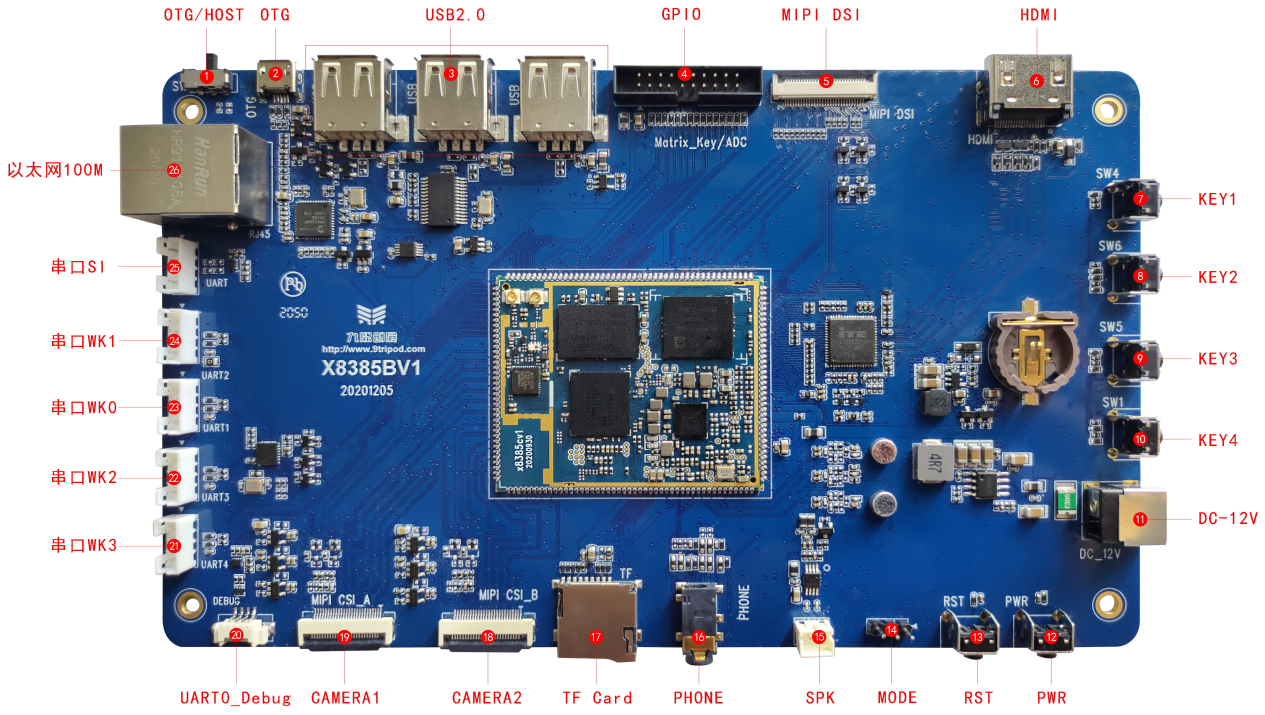
Hardware Interface List
| No. | Name | Description |
|---|---|---|
| 【1】 | DIP switch | Left: OTG download mode; right: USB HOST mode |
| 【2】 | Micro USB connector | OTG download port |
| 【3】 | USB HOST | Three USB HOST ports |
| 【4】 | GPIO | GPIO expansion header |
| 【5】 | DSI | MIPI display connector |
| 【6】 | HDMI | Standard HDMI connector |
| 【7】 | Independent keys | KEY1 |
| 【8】 | Independent keys | KEY2 |
| 【9】 | Independent keys | KEY3 |
| 【10】 | Independent keys | KEY4 |
| 【11】 | DC power input | 12V DC input |
| 【12】 | Power key | PWRKEY |
| 【13】 | Reset key | RESET |
| 【14】 | MODE | When eMMC is empty, move the jumper cap to the right for flashing during boot; after flashing, move it back to the left |
| 【15】 | SPK | Speaker output |
| 【16】 | Headphone jack | Headphone output |
| 【17】 | TF card | TF-card socket |
| 【18】 | MIPI CSI1 | MIPI Camera connector |
| 【19】 | MIPI CSI2 | MIPI Camera connector |
| 【20】 | UART0 | CPU UART0 output, default debug UART |
| 【21】 | I2C-to-UART 3 | UART3,Converted by UART bridge chip |
| 【22】 | I2C-to-UART 2 | UART2,Converted by UART bridge chip |
| 【23】 | I2C-to-UART 0 | UART0,Converted by UART bridge chip |
| 【24】 | I2C-to-UART 1 | UART1,Converted by UART bridge chip |
| 【25】 | UART1 | CPU UART1 output |
| 【26】 | Ethernet connector | USB-to-100M Ethernet connector |
Key Notes
- The DIP switch selects OTG download mode on the left and USB HOST mode on the right.
- The Micro USB connector is used for OTG download.
- USB HOST provides three HOST ports.
- MODE is used when the eMMC program is empty; move the jumper cap right to flash during boot, then move it back left after flashing.
- UART0 is CPU UART0 output and the default debug UART.
- Ethernet is a USB-to-100M Ethernet interface.