Hardware Resources
Front Interface Layout
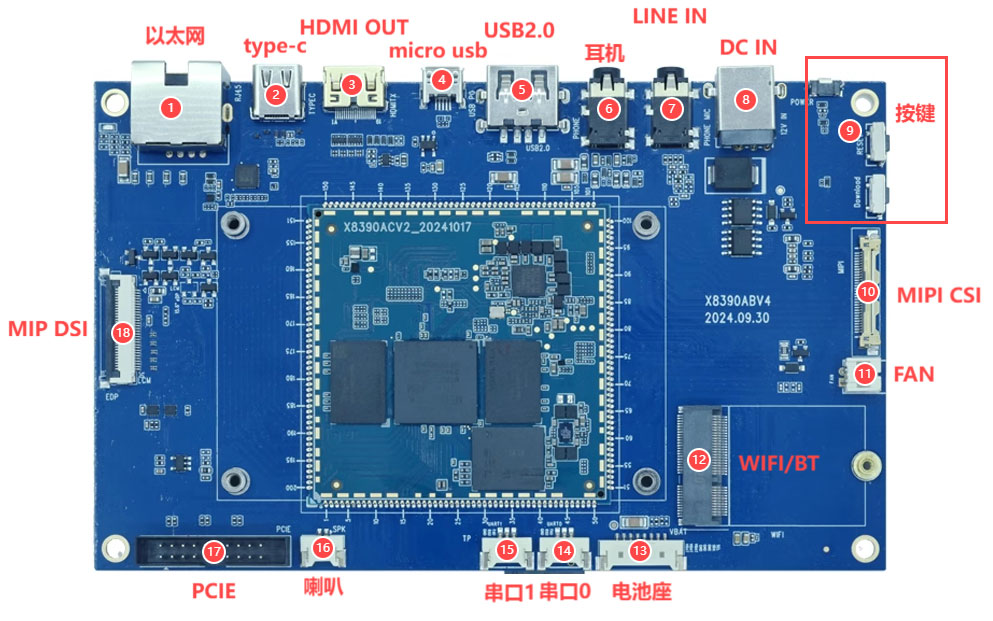
| No. | Name | Description |
|---|---|---|
| 1 | Ethernet | Gigabit Ethernet through an RGMII-connected RTL8211F PHY |
| 2 | Type-C | Full-featured Type-C connector |
| 3 | HDMI OUT | HDMI output |
| 4 | Micro USB | USB OTG and firmware flashing |
| 5 | USB2.0 | USB2.0 Type-A Host |
| 6 | Headphone | Headphone output |
| 7 | Line In | Analog audio input |
| 8 | DC IN | 12V DC input |
| 9 | Keys | Power, reset, and download keys from top to bottom |
| 10 | MIPI CSI | Camera connector |
| 11 | FAN | Fan connector |
| 12 | Wi-Fi/BT | M.2 wireless-module socket |
| 13 | Battery | 8.7V lithium-battery connector |
| 14 | UART0 | TTL debug UART |
| 15 | UART1 | Expansion TTL UART |
| 16 | Speaker | Single-channel speaker output |
| 17 | PCIe | 2 × 10-pin PCIe expansion connector |
| 18 | MIPI DSI | Display connector |
Rear Interface Layout
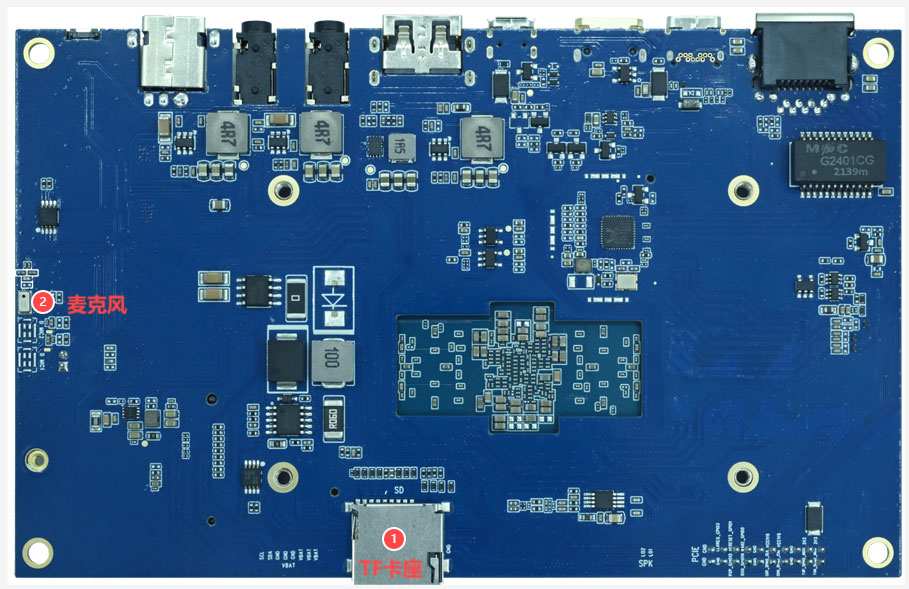
| No. | Name | Description |
|---|---|---|
| 1 | TF card | External boot or data storage |
| 2 | Digital microphone | On-board digital microphone, MIC2702 by default |
Resource Groups
Display and Touch
- MIPI DSI display connector.
- eDP display resources.
- HDMI OUT.
- I2C touch, power, reset, and backlight signals.
Networking and Wireless
- RTL8211F Gigabit Ethernet.
- AW-CB451NF Wi-Fi 6 / Bluetooth 5.0 module.
- PCIe expansion for high-speed peripherals.
Debugging and Upgrade
- UART0 is the default debug UART.
- Micro USB is used for firmware flashing or USB Device mode.
- The download key enters the MediaTek download mode.