Multimedia MPP
Architecture
MPP sits between applications and the VIN/ISP, codec, display, and audio drivers. It provides Camera, VENC, VDEC, VO, AI, AO, MUX, DEMUX, G2D, and related components.
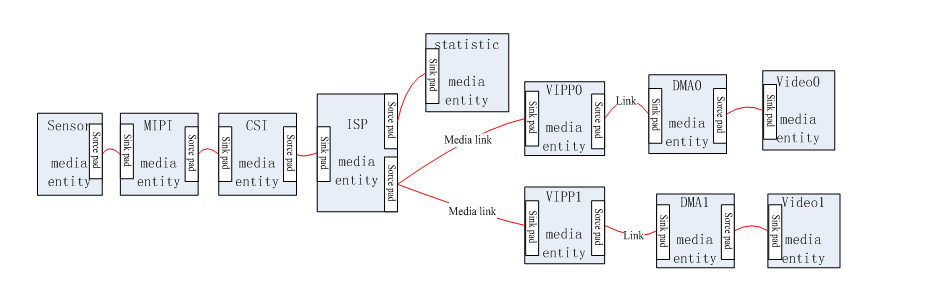
Common source paths:
platform/allwinner/eyesee-mpp/
platform/allwinner/multimedia/
platform/allwinner/tina_multimedia/libcedarc_mpp/
Configure and Build
source build/envsetup.sh
lunch
make menuconfig
# enable required MPP libraries and samples
m -j4
quick_config can switch MPP between static and shared libraries. Run make distclean before switching to avoid mixing old objects.
Generic Sample Flow
- Enable the target sample in menuconfig.
- Build the package or full SDK.
- Put the executable, configuration, and test media in the firmware or on a TF card.
- Mount the TF card and run the sample on the board.
- Validate serial logs, output streams, display output, and PC-side analysis tools.
Smart IPC Sample
sample_smartIPC_demo generally follows:
Camera/VIN -> ISP -> VENC -> file/network
                    -> VO/display
Audio input -> AENC -> file/network
Verify sensor selection, resolution, frame rate, bitrate, rate-control mode, output path, and memory-pool sizes.
Useful Test Tools
ffprobe output.h264
ffplay -f h264 output.h264
ffmpeg -i input.mp4 -f null -
Use aplay, arecord, or FFmpeg to verify audio sample rate, channel count, and sample width.
Debug Principles
- No frames: start with sensor, VIN, and ISP.
- Raw frames but no bitstream: inspect VENC input format, buffers, and memory pools.
- Encoding works but display is blank: inspect VO, layers, pixel format, and resolution.
- Long-run crashes: look for memory leaks, unreleased buffers, and full filesystems.