Camera and LCD Display
Camera Pipeline
The V821 camera pipeline consists of the sensor, MIPI CSI/DVP receiver, VIN, ISP, encoder, and application. Validate it stage by stage:
- Read the sensor ID over I2C.
- Verify MCLK, reset, PWDN, and power sequencing.
- Match MIPI lane count, data rate, VC/DT, and resolution.
- Confirm VIN/ISP link creation and frame output.
- Match H.264/JPEG encoder buffers and application formats.
Common directories:
bsp/drivers/vin/                    VIN/CSI/ISP drivers
bsp/drivers/vin/modules/sensor/     Sensor drivers
platform/allwinner/eyesee-mpp/      Multimedia applications and samples
After selecting a sensor through quick_config, still verify the I2C address, GPIOs, regulators, and MIPI route in board.dts.
Display Architecture
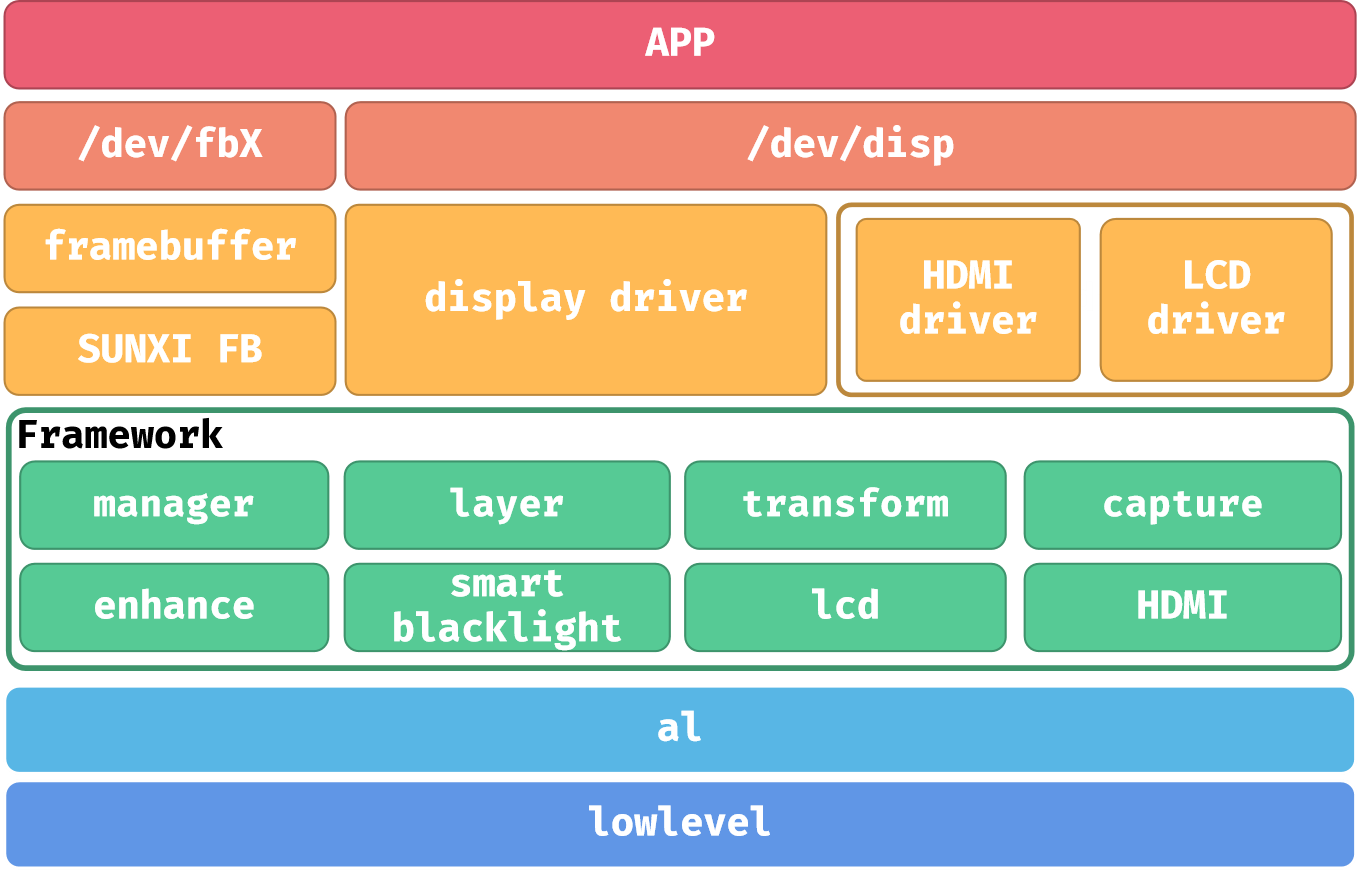
The documentation covers three display paths:
- DISP through
/dev/dispfor layers, rotation, and display control. - LCD framebuffer output.
- FBTFT/SPI DBI for small SPI panels.
Device-tree Configuration
A typical configuration contains:
&disp {
    status = "okay";
};

&lcd0 {
    lcd_used = <1>;
    lcd_driver_name = "panel_name";
    lcd_if = <...>;
    lcd_x = <240>;
    lcd_y = <320>;
    lcd_dclk_freq = <...>;
    status = "okay";
};
Important timing parameters:
| Parameter | Meaning |
|---|---|
lcd_x / lcd_y | Active resolution |
lcd_ht | Horizontal total |
lcd_hbp | Horizontal back-porch-related value |
lcd_vt | Vertical total |
lcd_vbp | Vertical back-porch-related value |
lcd_dclk_freq | Pixel clock according to the driver unit convention |
lcd_start_delay | TCON start delay |
lcd_width / lcd_height | Physical dimensions for DPI calculation |
Debug Order
- Verify backlight and panel power first.
- Check SPI/DBI waveforms and pin multiplexing.
- Use solid-color tests to isolate application issues.
- For corrupted output, check resolution, pixel format, RGB/BGR order, and address-window settings.
- If the backlight is on but the panel is blank, confirm reset timing and panel initialization commands.