Hardware Resources
This page summarizes connector locations, interface descriptions, and software driver support. For detailed connector usage, see Interface Details. For mechanical size and full specifications, see Size and Specifications.
Top View
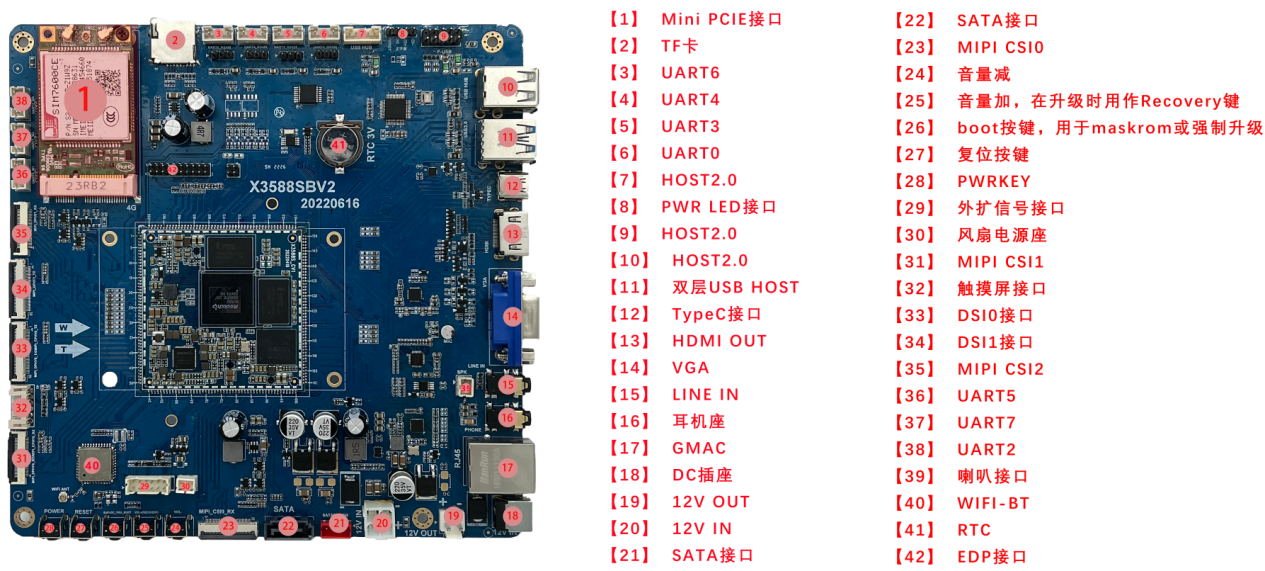
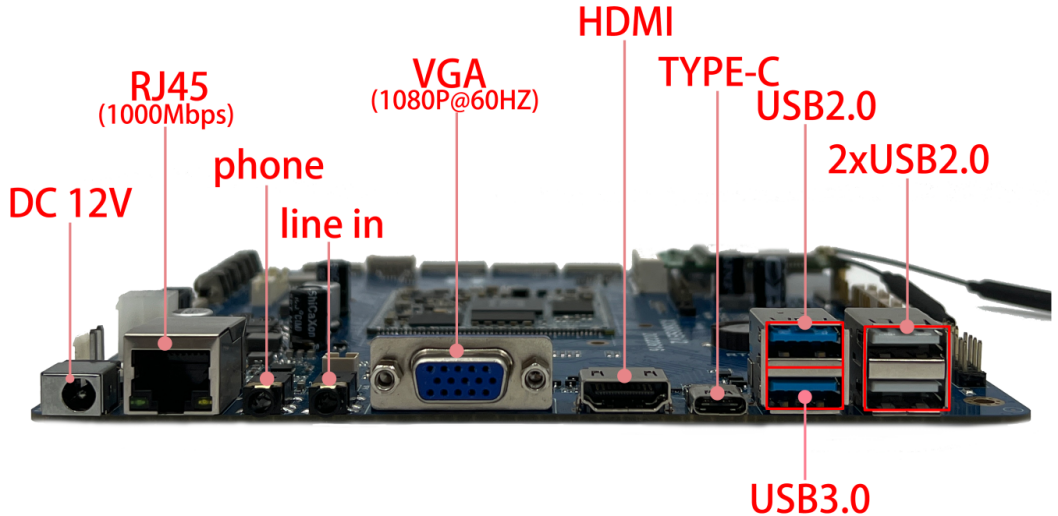
Side View
Hardware Interface List
| No. | Name | Description |
|---|---|---|
| 【1】 | Mini PCIE interface | External expansion 4G Wireless wireless communication module |
| 【2】 | TF card | TF card holder |
| 【3】 | UART6 | UART6, RS485 level interface, configurable to TTL level |
| 【4】 | UART4 | UART4, RS485 level interface, configurable to TTL level |
| 【5】 | UART3 | UART3, RS232 level interface |
| 【6】 | UART0 | UART0, RS232 level interface |
| 【7】 | HOST2.0 | USB HOST2.0 interface |
| 【8】 | PWR LED interface | POWER button and LED indicator for external chassis |
| 【9】 | HOST2.0 | USB HOST2.0 interface, connected to the USB expansion port on the front of the chassis |
| 【10】 | HOST2.0 | Double-layer USB HOST2.0 interface |
| 【11】 | Double layer USB HOST | Double-layer USB HOST interface, the upper layer is HOST2.0 and the lower layer is HOST3.0 |
| 【12】 | TypeC interface | Standard TypeC interface for program downloading, etc. |
| 【13】 | HDMI OUT | HDMI1 output interface |
| 【14】 | VGA | VGA signal output |
| 【15】 | LINE IN | audio recording interface |
| 【16】 | Headphone holder | Headphone output |
| 【17】 | GMAC | Gigabit Ethernet interface, PCIE interface |
| 【18】 | DC socket | 12V DC power input interface |
| 【19】 | 12V OUT | 12V power output, GPIO controllable |
| 【20】 | 12V IN | 12V DC power input, standard chassis power input interface |
| 【21】 | SATA interface | SATA power interface |
| 【22】 | SATA interface | SATA signal interface |
| 【23】 | MIPI CSI0 | MIPI camera interface |
| 【24】 | Independent buttons | Volume down |
| 【25】 | Independent buttons | Volume up, used as Recovery key when upgrading |
| 【26】 | Independent buttons | boot button, used for maskrom or forced upgrade |
| 【27】 | Independent buttons | reset button |
| 【28】 | Independent buttons | PWRKEY |
| 【29】 | External expansion signal interface | Expansion base for power on, reset, program update, GPIO control, etc. |
| 【30】 | fan power holder | DC12V, GPIO controllable fan power base |
| 【31】 | MIPI CSI1 | MIPI camera interface |
| 【32】 | touch screen interface | I2C communication, touch screen interface |
| 【33】 | display interface | DSI0 interface |
| 【34】 | display interface | DSI1 interface |
| 【35】 | MIPI CSI2 | MIPI camera interface |
| 【36】 | UART5 | UART5, TTL level interface, expandable CAN interface |
| 【37】 | UART7 | UART7, TTL level interface |
| 【38】 | UART2 | UART2, TTL level interface, defaults to debugging serial port |
| 【39】 | Speaker interface | External two-channel speakers |
| 【40】 | WIFI-BT | Dual-band WIFI, BT module |
| 【41】 | RTC | RTC button battery |
| 【42】 | display interface | EDP interface, multiplexed with HDMI output interface |
Software and Driver Support
The X3588S mini ITX board supports Android 12, Linux, Ubuntu, Debian, and Buildroot/QT related systems. The driver support table is kept from the original manual:
| system / driver | linux+ / android12 | linux+ / Debian10 | linux+ / ubuntu | linux+QT |
|---|---|---|---|---|
| 7-inch MIPI screen (1024*600) | ● | ● | ● | Coming soon |
| Backlight driver | ● | ● | ● | Coming soon |
| PMIC driver (RK806) | ● | ● | ● | Coming soon |
| capacitive touch | ● | ● | ● | Coming soon |
| EMMC driver | ● | ● | ● | Coming soon |
| SD card driver | ● | ● | ● | Coming soon |
| Independent buttons | ● | ● | ● | Coming soon |
| ADC driver | ● | Coming soon | Coming soon | Coming soon |
| Turn on and off | ● | Coming soon | Coming soon | Coming soon |
| wake up from sleep | ● | Coming soon | Coming soon | Coming soon |
| Six-way USB HOST2.0 driver | ● | ● | ● | Coming soon |
| All the way USB HOST3.0 driver | ● | ● | ● | Coming soon |
| All the way TypeC driver | ● | Coming soon | Coming soon | Coming soon |
| mini PCIE wireless | ● | Coming soon | Coming soon | Coming soon |
| SATA driver | ● | ● | ● | Coming soon |
| RTC driver | ● | ● | ● | Coming soon |
| Audio | ● | Coming soon | Coming soon | Coming soon |
| recording | ● | Not supported | Not supported | Coming soon |
| WIFI | ● | ● | ● | Coming soon |
| BT | ● | Coming soon | Coming soon | Coming soon |
| CSI camera driver | Coming soon | Not supported | Not supported | Coming soon |
| USB port camera driver | ● | ● | ● | Coming soon |
| serial port | ● | ● | ● | Coming soon |
| CAN bus | ● | Coming soon | Coming soon | Coming soon |
| HDMI OUT | ● | ● | ● | Coming soon |
| VGA | ● | ● | ● | Coming soon |
| Gigabit Ethernet | ● | ● | ● | Coming soon |