Development Environment
This page summarizes the basic environment and tools required for X3128 Android development. The original manual uses Ubuntu 14.04 64-bit as the example environment. For full source compilation, a physical Linux host is recommended instead of a virtual machine.
Ubuntu Environment
Install common tools:
sudo apt-get update
sudo apt-get install meld
sudo apt-get install minicom
sudo apt-get install picocom
minicom Serial Configuration
When using a USB-to-serial adapter, the common device node is /dev/ttyUSB0.
sudo minicom -s
Typical serial parameters:
Serial device: /dev/ttyUSB0
Baud rate: 115200
Data bits: 8
Parity: None
Stop bits: 1
Hardware flow control: No
Software flow control: No
Check whether the USB-to-serial driver is loaded:
lsmod | grep pl2303
dmesg | tail -f
picocom
picocom is lightweight and suitable for directly viewing serial logs:
sudo picocom -b 115200 /dev/ttyUSB0
ADB Tools
On Windows, place adb.exe, AdbWinApi.dll, AdbWinUsbApi.dll, and fastboot.exe in the system path. After the board boots into Android, enable USB debugging and run:
adb devices
adb shell
If more than one device and emulator is reported, stop the adb.exe process and retry.
SecureCRT
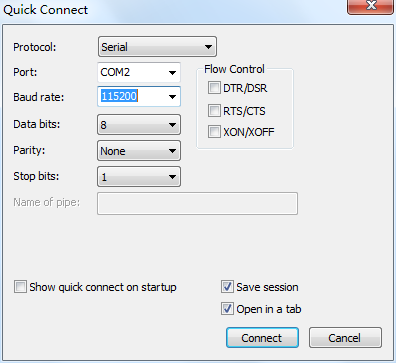
Use the Serial protocol in SecureCRT. Set baud rate to 115200, data bits to 8, stop bits to 1, no parity, and do not enable the three flow-control options.
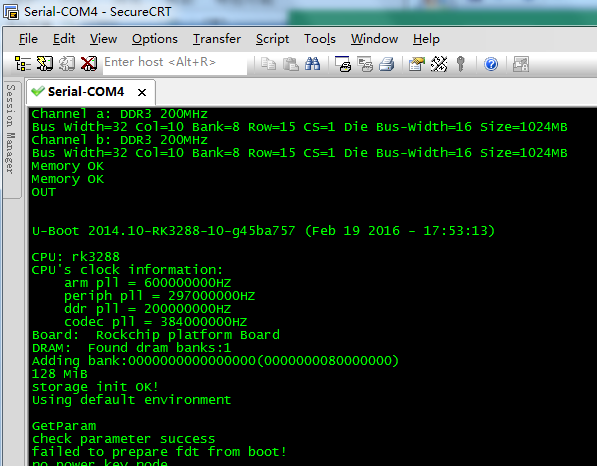
After connecting the debug UART, U-Boot and Android boot logs can be viewed.