Hardware Resources
This page summarizes connector locations and hardware resources for the X30 development board. For design notes, see Hardware Design. For the complete 144-pin definition, see Core Board Pin Definition.
Board Interface Map
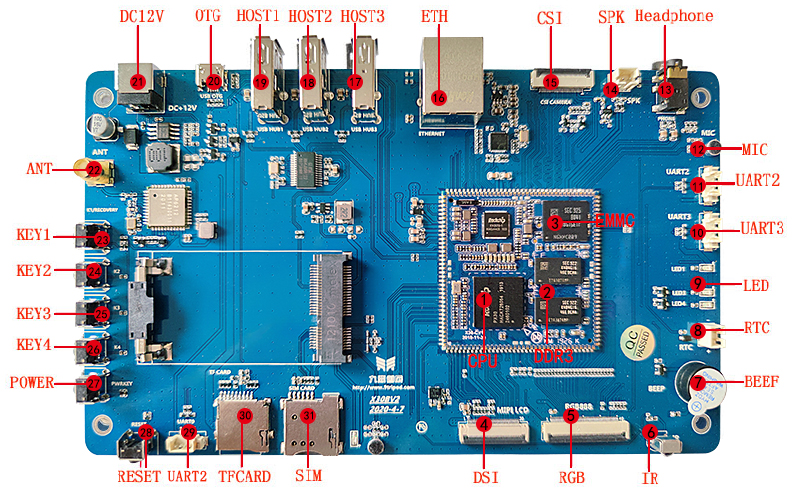
Hardware Interface List
| No. | Name | Description |
|---|---|---|
| 【1】 | CPU | PX30,A35,4*1.3GHz |
| 【2】 | Memory | 1GB DDR3 |
| 【3】 | eMMC | 8GB |
| 【4】 | DSI | MIPI or LVDS LCD interface |
| 【5】 | RGB | RGB LCD screen interface |
| 【6】 | IR | Infrared integrated receiver |
| 【7】 | BEEP | buzzer |
| 【8】 | RTC | RTC battery holder, 2.0 interface |
| 【9】 | LED light | Four-way programmable LED lights |
| 【10】 | UART3 | Serial port 3, TTL level |
| 【11】 | UART2_M1 | Serial port 2, TTL level, default debugging serial port. |
| 【12】 | MIC | Onboard microphone input |
| 【13】 | Headphone holder | Headphone output |
| 【14】 | Speaker interface | External speaker interface |
| 【15】 | CSI | MIPI camera interface |
| 【16】 | 100M network port | 100M Ethernet interface |
| 【17】 | USB HOST3 | USB HOST2.0 interface |
| 【18】 | USB HOST2 | USB HOST2.0 interface |
| 【19】 | USB HOST1 | USB HOST2.0 interface |
| 【20】 | OTG | Program download interface, HOST function can be used when OTG function is used |
| 【21】 | DC block | 12V DC power input |
| 【22】 | ANT | WIFI/BT antenna interface |
| 【23】 | K1 | Independent buttons |
| 【24】 | K2 | Independent buttons |
| 【25】 | K3 | Independent buttons |
| 【26】 | K4 | Independent buttons |
| 【27】 | POWER | Power button |
| 【28】 | RESET | reset button |
| 【29】 | UART2_M0 | Serial port 2, TTL level, multiplexed with TF card, can be configured as a debugging serial port through the program. By default, UART2_M1 is used as the debugging serial port. |
| 【30】 | TF card | TF card holder |
| 【31】 | SIM card slot | 3G, 4G mobile phone card slot |
| 【32】 | PCIE interface | Connect to the PCIE interface of 3G and 4G modules |
| 【33】 | WIFI/BT | AP6212 WIFI/BT two-in-one module |