Interface Details
This page summarizes the hardware interfaces and keeps the interface images from the original hardware manual.
Power Switch and DC Jack

The mainboard uses a 12V DC power input. Use a suitable power adapter according to the hardware design requirements.
Debug UART

The default debug UART is UART2. The debug port can be used to view boot logs and enter the system console.
HDMI Interface

The mainboard provides HDMI input/output interfaces. The exact display path and supported modes depend on the firmware configuration.
Camera Interface
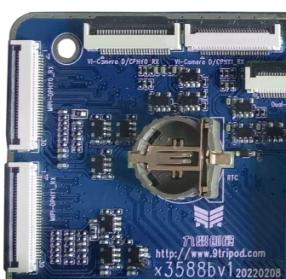
The mainboard provides FPC camera connectors for external MIPI CSI cameras. Check lane configuration and power sequence before connecting a camera.
Ethernet Interface
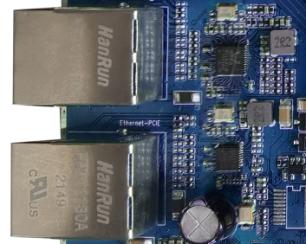
The mainboard provides wired Ethernet interfaces for network access.
Headphone Interface

The headphone jack can be used for audio output.
LINE IN Interface

The LINE IN connector is used for external audio input.
Speaker Interface

The speaker connector is used for external speaker output.
Microphone Interface

The microphone connector is used for recording input.
TF Card Slot

The TF card slot can be used for removable storage or related boot/update functions depending on firmware support.
Buttons

The independent buttons are used for power, reset, boot, recovery, and other board control functions.
Type-C Interface

The Type-C interface is mainly used for program download, ADB debugging, or USB OTG functions depending on the board design.
USB HOST2.0 Interface

USB HOST2.0 can be used to connect USB mouse, keyboard, flash disk, or other USB peripherals.
Power Button

The power button is used to power on, shut down, suspend, or wake the system depending on firmware behavior.
Reset Button

The reset button is used to reset the system.
BOOT Button

The BOOT button is used for firmware download or forcing the board into upgrade mode.
Recovery Button

The Recovery button is used to enter recovery or loader-related modes.
LCD Interface

The LCD interface is used for external display modules. Confirm timing, power, and backlight configuration before use.
Backup Battery

The backup battery provides RTC power so the system time can be retained after power loss.
Wi-Fi / Bluetooth Module

The onboard Wi-Fi/Bluetooth module provides wireless network and Bluetooth connectivity.
UART Interfaces

UART connectors are provided for external serial devices or debugging.
PCIe Interface

The PCIe interface can be used for supported high-speed peripherals.
SATA Interface

The SATA interface can be used for supported storage devices.