Hardware Resources
This page summarizes connector locations and hardware resources for the I3566 mainboard. For connector usage, see Interface Details. For the complete 172-pin core-board definition, see Core Board Pin Definition. For PH connectors and expansion headers, see Expansion Connector Definition.
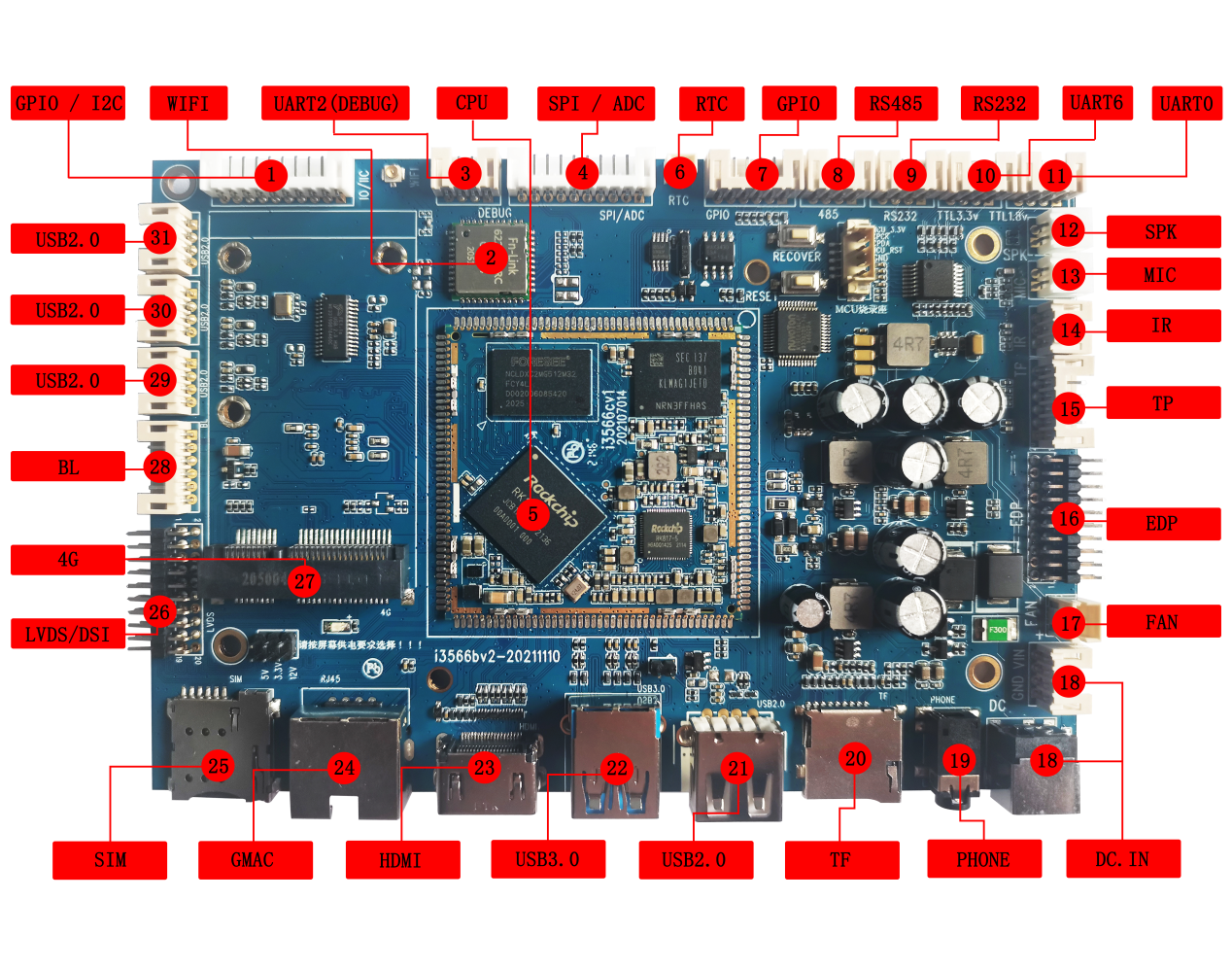
Hardware Interface List
| No. | Name | Description |
|---|---|---|
| 【1】 | GPIO/I2C | GPIO / I2C expansion interface |
| 【2】 | Wi-Fi | 6221A-SRC dual-band Wi-Fi module |
| 【3】 | UART2 | UART2, TTL-level interface, default debug UART |
| 【4】 | CIF | Parallel camera interface |
| 【5】 | RK3566 core module | I3566 core board |
| 【6】 | RTC | RTC battery holder, 3V supply |
| 【7】 | GPIO | GPIO expansion interface |
| 【8】 | RS485 | RS485 interface |
| 【9】 | RS232 | RS232 interface |
| 【10】 | UART6 | 3.3V TTL-level UART6 interface |
| 【11】 | UART0 | 1.8V TTL-level UART0 interface |
| 【12】 | Speaker interface | External dual-channel speaker |
| 【13】 | Microphone interface | External microphone input |
| 【14】 | Infrared receiver | HS0038 integrated IR receiver |
| 【15】 | touch screen interface | 6-pin PH connector for external capacitive touch panel |
| 【16】 | display interface | EDP interface |
| 【17】 | FAN | Cooling fan power connector |
| 【18】 | DC socket | 12V DC power input through DC jack or 4-pin PH connector |
| 【19】 | Headphone holder | Headphone output |
| 【20】 | TF card | TF-card socket |
| 【21】 | HOST 2.0 | USB HOST 2.0 interface, multiplexed as OTG download port |
| 【22】 | USB 3.0 | USB HOST 3.0 interface |
| 【23】 | HDMI | HDMI output interface |
| 【24】 | GMAC | Gigabit Ethernet interface |
| 【25】 | SIM card | SIM-card interface for 4G module |
| 【26】 | display interface | DSI0 or LVDS interface |
| 【27】 | 4G wireless | Connects 4G wireless module |
| 【28】 | Screen backlight interface | PH connector for high-power screen backlight |
| 【29】 | HOST 2.0 | USB HOST 2.0 interface,Routed through PH connector |
| 【30】 | HOST 2.0 | USB HOST 2.0 interface,Routed through PH connector |
| 【31】 | HOST 2.0 | USB HOST 2.0 interface,Routed through PH connector |