开发环境
本页整理 X3128 Android 开发所需的基础环境和常用工具。原手册以 Ubuntu 14.04 64 位系统为例,建议源码编译使用实体 Linux 主机,不建议使用虚拟机。
Ubuntu 开发环境
常用工具安装:
sudo apt-get update
sudo apt-get install meld
sudo apt-get install minicom
sudo apt-get install picocom
minicom 串口配置
使用 USB 转串口时,常见设备节点为 /dev/ttyUSB0。配置 minicom:
sudo minicom -s
常用串口参数:
Serial device: /dev/ttyUSB0
Baud rate: 115200
Data bits: 8
Parity: None
Stop bits: 1
Hardware flow control: No
Software flow control: No
查看 USB 转串口驱动是否加载:
lsmod | grep pl2303
dmesg | tail -f
picocom 串口调试
picocom 比 minicom 更轻量,适合直接查看串口日志:
sudo picocom -b 115200 /dev/ttyUSB0
ADB 工具
Windows 下可将 adb.exe、AdbWinApi.dll、AdbWinUsbApi.dll、fastboot.exe 放到系统路径中。开发板进入 Android 后,打开 USB debugging,再执行:
adb devices
adb shell
如果提示 more than one device and emulator,可结束 adb.exe 进程后重新执行 ADB 命令。
串口工具 SecureCRT
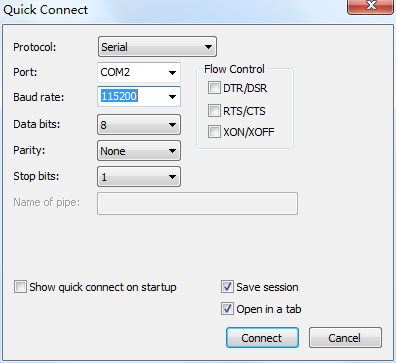
SecureCRT 使用 Serial 协议连接,波特率设置为 115200,数据位 8,停止位 1,无校验,右侧三个流控选项不要勾选。
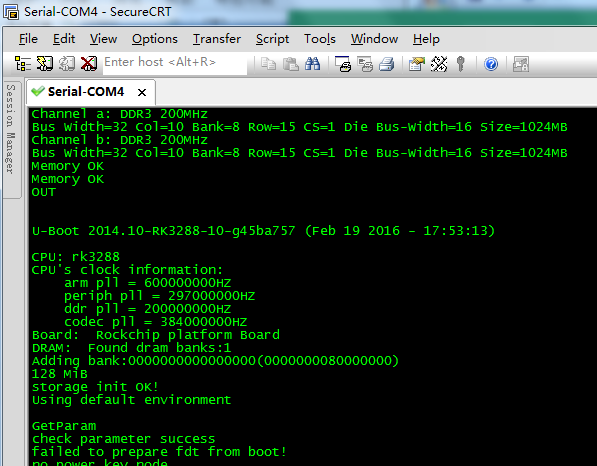
连接调试串口后,可查看 U-Boot 和 Android 启动日志。